





GitHub Actions vs GitLab CI: Which CI/CD Platform Fits Your Team in 2026
A clear GitHub Actions vs GitLab CI comparison covering pricing, setup difficulty, and features. See which CI/CD platform fits your team before you commit your workflow.
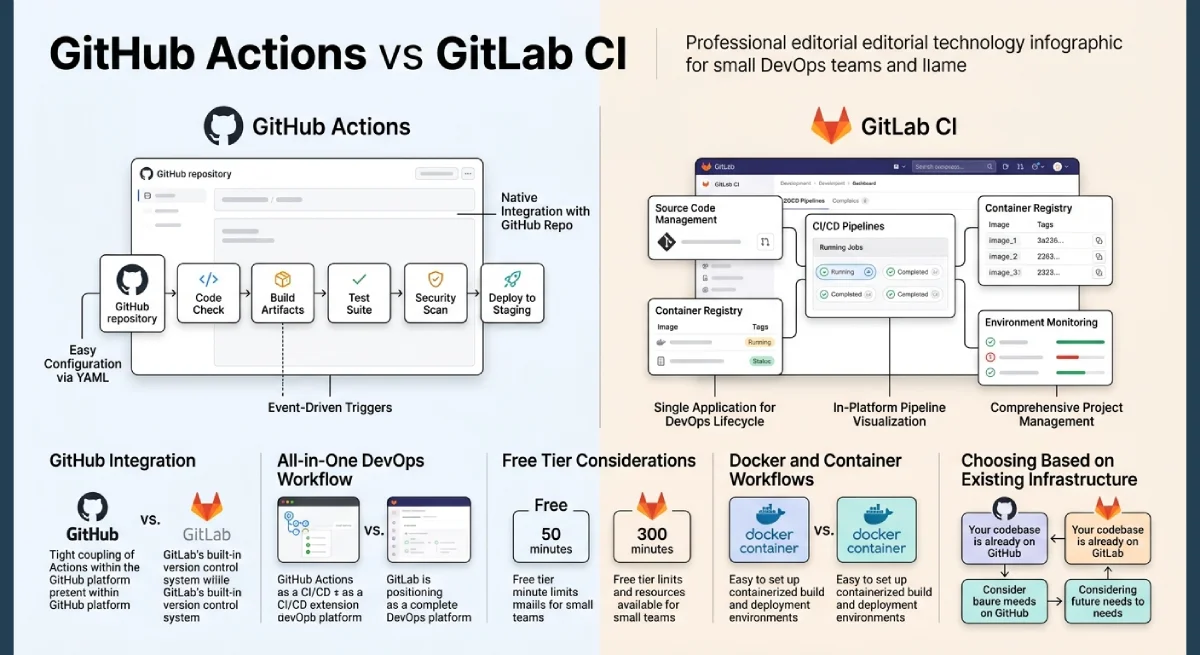
GitHub Actions works best for teams already hosting code on GitHub, since it needs almost no extra setup to start running workflows. GitLab CI fits teams that want an all-in-one platform, combining code hosting, pipelines, and basic monitoring in one dashboard. Neither tool is universally better, since the right pick depends on your existing setup and team size.
Table Of Content
This comparison breaks down pricing, setup difficulty, and core features for both CI/CD platforms. You will see where each tool wins, where it falls short, and which one fits a small or growing DevOps team best. By the end, you should know exactly which platform to test first.
Key Takeaways
- GitHub Actions fits teams already using GitHub for code hosting.
- GitLab CI suits teams wanting code, pipelines, and monitoring together.
- Free tiers cover most small team needs on both platforms.
- GitLab handles heavy Docker workflows more smoothly out of the box.
- Choose based on existing tools, not just feature comparisons alone.
Why This Comparison Matters for Small Teams
Choosing a CI/CD platform affects daily development speed for months or years. Switching later means rewriting pipeline configuration files and retraining your team on new syntax. Getting this GitHub Actions vs GitLab CI decision right early saves real engineering hours down the road.

Small teams especially feel this cost, since they rarely have spare time for a mid-year platform migration. A tool that fits naturally into your existing workflow reduces friction from day one. This comparison focuses on practical differences that actually affect daily work, not just marketing feature lists.
Pricing also matters more for small teams working with tight budgets. Both platforms offer free tiers, but the actual usable minutes differ significantly between them. Understanding this difference upfront avoids unexpected costs once your pipeline usage grows.
Team familiarity plays a role too, often more than either platform’s marketing suggests. Developers who already know GitHub’s interface adapt faster to GitHub Actions, while GitLab veterans feel more at home with GitLab CI. This comfort factor can shorten onboarding time considerably.
What to Consider Before Choosing
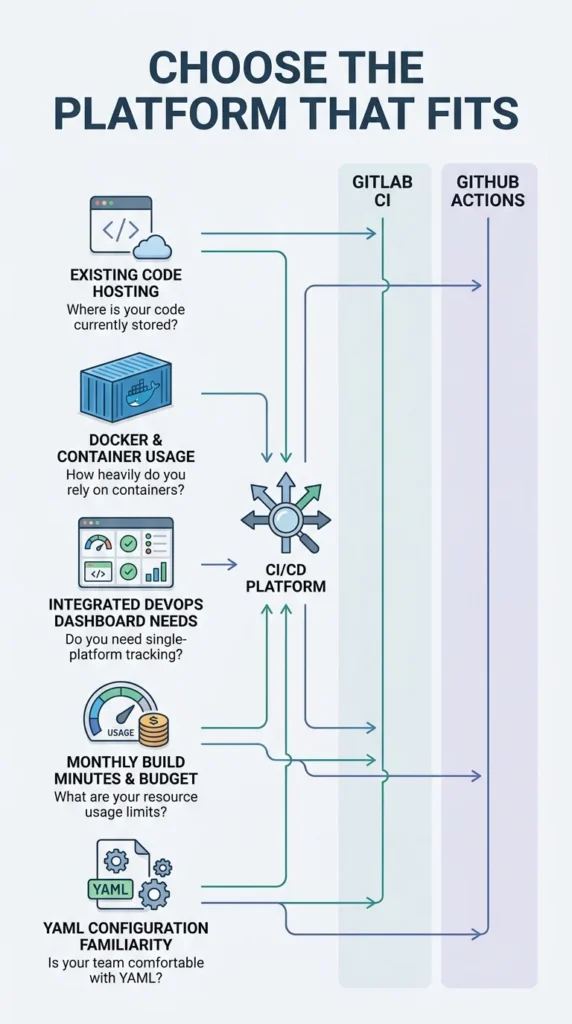
Not every CI/CD platform fits every workflow. Review these factors before making a final decision:
- Where your code is currently hosted: GitHub or GitLab
- How heavily your pipelines rely on Docker builds
- Whether your team needs an integrated dashboard for code and pipelines together
- Monthly build minutes your team typically uses
- Comfort level with YAML configuration syntax
Skipping this review often leads teams to pick based on popularity rather than actual fit. A short internal check saves migration headaches later. Even a single afternoon spent testing both platforms on a sample project often reveals more than reading feature comparisons online.
GitHub Actions vs GitLab CI Compared
This section breaks down both platforms across the areas that matter most for daily use.
Setup and Configuration
GitHub Actions integrates directly with existing GitHub repositories, requiring almost no separate setup. Workflow files live in a dedicated folder and trigger automatically based on repository events. Most developers already familiar with GitHub can start within an hour.
GitLab CI uses a flatter, stage-based configuration style that many teams find easier to visualize. Its pipeline structure maps closely to the YAML file itself, reducing confusion for newer team members. Both platforms have converged in syntax complexity over recent updates.
Matrix builds show one clear syntax difference worth noting. GitHub Actions handles multiple operating systems and language versions in one compact configuration block. GitLab requires a bit more manual setup to achieve the same parallel testing coverage across environments.
Docker and Container Workflows
GitLab CI handles Docker builds more smoothly by default, offering native Docker-in-Docker support. Teams running container-heavy pipelines often find this saves setup time compared to GitHub Actions. GitHub requires additional marketplace actions to reach similar functionality.
This difference matters most for teams deploying containerized applications regularly. If your pipeline rarely touches Docker, this advantage becomes far less relevant to your daily workflow.
Interactive debugging is another area where GitLab pulls ahead. It offers a native web terminal for stepping into a live job, while GitHub Actions typically needs a third-party action for SSH access. Teams that frequently debug failing pipelines may value this built-in convenience.
Pricing and Free Tier Limits
GitHub Actions offers two thousand free minutes monthly for private repositories, with unlimited minutes for public repositories. GitLab SaaS provides four hundred free minutes monthly, though self-hosted runners remove this limit entirely. Teams with tight budgets should factor this difference into their decision early.
Self-hosting runners changes this calculation significantly for both platforms. Teams comfortable managing their own infrastructure can reduce or eliminate ongoing CI/CD costs on either platform.
Overage pricing also differs once free minutes run out. GitHub charges a small per-minute fee beyond its free tier, while GitLab bills per additional block of minutes purchased. Neither cost is dramatic for small teams, but the billing structure feels more predictable on GitLab for teams with steady, high-volume pipeline usage.
Storage costs for build artifacts and caches also factor into total monthly spend. Both platforms include reasonable free storage limits before charging extra. Teams running large test suites with heavy caching should check current limits directly, since these numbers change periodically on both platforms.
Ecosystem and Marketplace
GitHub Actions benefits from a massive marketplace of prebuilt actions, covering nearly every common automation need. This large ecosystem often means less custom scripting for standard tasks like deployment or notifications. GitLab’s component catalog is smaller but growing steadily.
Teams that prefer writing custom configuration over relying on third-party actions may see GitLab’s approach as more predictable. Fewer external dependencies can also mean fewer surprises during platform updates.
Security scanning is another area worth a quick mention. GitLab bundles some security scanning features directly into its pipeline templates for paid tiers. GitHub Actions relies more on marketplace actions or separate tools like Dependabot for similar coverage.
Key Terms in CI/CD Platforms
A few terms come up often when comparing GitHub Actions and GitLab CI. Understanding them helps clarify which features actually matter for your team.
- A runner is the machine that executes your pipeline jobs.
- A workflow defines the steps and triggers for a CI/CD process.
- A matrix build runs the same job across multiple configurations at once.
- A self-hosted runner lets teams run pipelines on their own infrastructure.
- A pipeline is the full sequence of automated build, test, and deploy steps.
Knowing these terms speeds up conversations between developers evaluating either platform. It also makes vendor documentation easier to follow during setup.
GitHub Actions vs GitLab CI Comparison Table
| Feature | GitHub Actions | GitLab CI |
|---|---|---|
| Best for | GitHub hosted repos | All-in-one DevOps platform |
| Free tier | 2,000 min private, unlimited public | 400 min, unlimited self-hosted |
| Docker support | Requires extra actions | Native, built-in |
| Marketplace | 20,000 plus actions | Smaller, growing catalog |
| Setup difficulty | Low | Low to moderate |
Frequently Asked Questions
Is GitHub Actions better than GitLab CI?
Neither is universally better in the GitHub Actions vs GitLab CI debate, since the right choice depends on where your code lives. GitHub Actions suits GitHub-hosted teams, while GitLab CI fits teams wanting an integrated platform.
Which platform is cheaper for small teams?
GitHub Actions offers more free minutes for private repositories at two thousand per month. GitLab’s four hundred free minutes work well for lighter usage or teams using self-hosted runners.
Does GitLab CI handle Docker better than GitHub Actions?
Yes, GitLab CI offers native Docker-in-Docker support without extra configuration. GitHub Actions can achieve similar results but usually needs additional marketplace actions.
Can teams use both GitHub Actions and GitLab CI together?
It is possible but uncommon, since most teams standardize on one platform for simplicity. Mixed setups usually only happen during a migration between the two.
How long does it take to switch CI/CD platforms?
Switching typically takes a few days to a few weeks, depending on pipeline complexity. Simple pipelines migrate quickly, while complex multi-stage workflows take longer to rebuild and test.
Do both platforms support scheduled and cron-based jobs?
Yes, both GitHub Actions and GitLab CI support scheduled triggers for recurring tasks. Configuration syntax differs slightly, but the underlying capability works the same way on either platform.
Conclusion
Choosing between GitHub Actions and GitLab CI comes down to your existing tools and workflow needs. GitHub Actions fits naturally for teams already on GitHub, while GitLab CI appeals to teams wanting pipelines and code hosting together. Both handle standard CI/CD needs well for small and growing teams.
Test your top choice with a real, low-risk pipeline before fully committing. This reveals setup friction and hidden costs before they affect your main production workflow. Either platform can serve your team well once matched to your actual development habits. The GitHub Actions vs GitLab CI decision, in the end, comes down to fit rather than raw feature count.
Want more guides like this? Explore the full Cloud and DevOps collection on TechAndTrends to keep your development workflow efficient and reliable.



No Comment! Be the first one.