





Best DevOps Tools for Small Teams: A Practical Guide
Small teams need devops tools that save time and stay within budget. This guide compares the best devops tools for small teams across CI/CD, monitoring, automation, and hosting so you can build a...
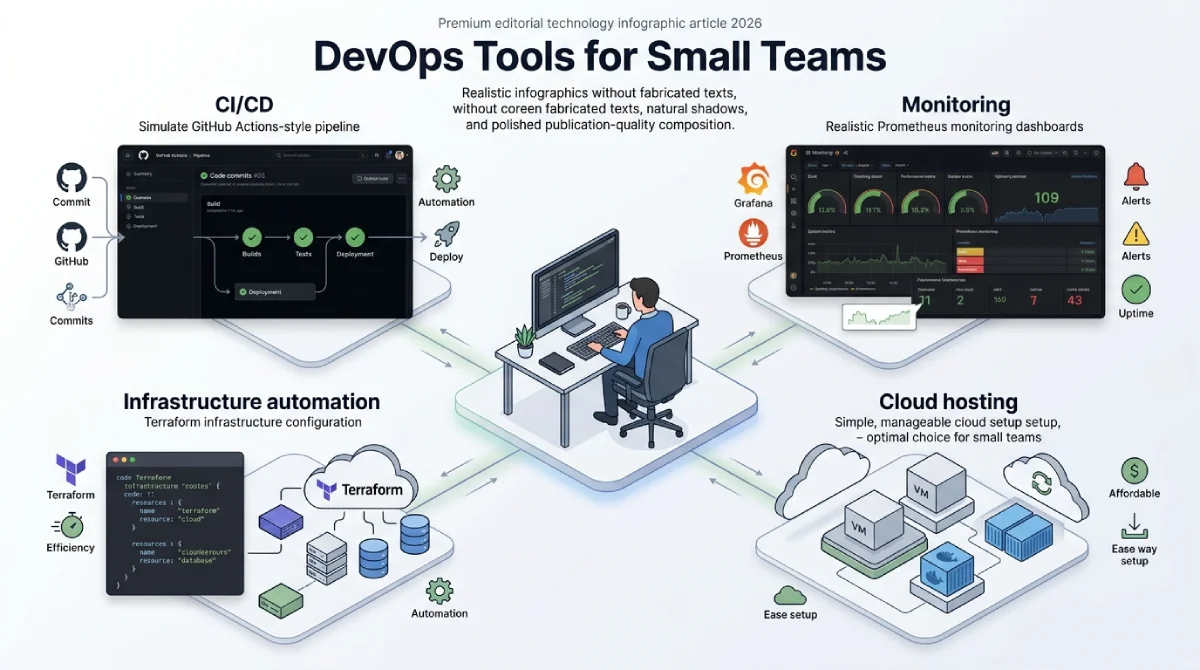
The best DevOps tools for small teams are GitHub Actions, Grafana with Prometheus, Terraform, and Render. These tools cover CI/CD, monitoring, automation, and hosting without heavy setup costs. Most offer free tiers, making them ideal for startups with tight budgets. This guide compares each option so you can pick the right stack fast.
Key Takeaways
- Small teams need DevOps tools that are simple, affordable, and fast to set up.
- CI/CD, monitoring, and infrastructure automation are the three core tool categories.
- Free and low cost tools now offer features that once needed a full team.
- Picking one tool per category avoids wasted time and tool overload.
- Kubernetes monitoring and dedicated server tools pair well with this stack.
Why Small Teams Need the Right DevOps Tools
Small teams rarely have a dedicated DevOps engineer on staff. One or two developers often handle deployment, monitoring, and infrastructure at the same time. Without the right tools, this workload becomes stressful and slows down every release.
The best DevOps tools for small teams solve this problem directly. They automate repetitive tasks and reduce the need for manual server checks. This frees up time for actual product work instead of firefighting.
Choosing wisely also protects team morale over time. Constant manual fixes wear developers down and slow future hiring plans. A well-chosen tool stack keeps small teams calm even during busy launch weeks.
Budget also matters more for small teams than large companies. Many enterprise DevOps platforms charge based on team size or server count. Small teams need pricing that scales with growth. They should avoid tools built for large budgets from day one.
Choosing the best DevOps tools for small teams early also prevents costly migrations later. Switching platforms after a product launch can break workflows and waste engineering time. Getting the stack right at the start saves months of rework down the line.
What to Look for in DevOps Tools for Startups
Not every DevOps tool fits a small team. Startups should focus on ease of setup over deep customization. A tool that takes weeks to configure will slow down a small team more than it helps.
Look for tools with clear documentation and active community support. Small teams cannot afford long support tickets when something breaks at midnight. Community forums and simple guides often solve problems faster than official support channels.
Pricing structure matters just as much as features. Many top DevOps platforms offer free tiers that cover small projects completely. Choose tools that let you start free and upgrade only when your team actually grows.
Integration with your existing stack also saves setup time. A tool that connects easily with GitHub, Slack, or your cloud provider needs less custom work. Small teams should avoid tools that require heavy engineering just to get started.
Best DevOps Tools for Small Teams in 2026
This section breaks down the top picks by category. Each tool was chosen for ease of use, pricing, and real world reliability with small teams.
Best for CI/CD
GitHub Actions remains the top pick for small teams already using GitHub. It integrates directly into your existing repository without extra setup. The free tier covers most small project needs without any cost. Workflows are written in simple YAML files that most developers already understand.
GitLab CI is a strong alternative for teams that prefer an all-in-one platform. It combines code hosting, CI/CD, and basic monitoring in one dashboard. This reduces the number of separate tools your team needs to manage. Teams that value fewer logins and simpler billing often prefer this option.
Both tools support automated testing before code reaches production. This catches bugs early, before customers ever see them. Small teams save hours each week by skipping manual test runs.
Best for Monitoring
Grafana paired with Prometheus is the standard choice for small team monitoring. Both tools are open source and free to run on your own servers. They pair especially well with Kubernetes environments for tracking cluster health. Dashboards can be customized without writing extra code.
For teams that want a hosted option, Better Stack offers simple uptime and log monitoring. It skips the complex setup that tools like Datadog often require. Small teams get clear alerts without needing a dedicated monitoring specialist. Setup usually takes less than an hour from signup to first alert.
Good monitoring catches problems before customers report them. A small team without monitoring often learns about outages from angry emails. That delay can cost trust and revenue that takes months to rebuild.
Best for Infrastructure Automation
Terraform remains the leading choice for infrastructure as code among small teams. It works across almost every cloud provider without vendor lock-in. The learning curve is manageable for developers with basic scripting experience.
Ansible is a solid pick for teams that want simpler automation without a code-heavy setup. It uses readable configuration files instead of a full programming language. This makes it easier for non-specialists to contribute to automation scripts.
Best Free and Budget-Friendly Option
Render and Railway both offer strong free tiers for small team deployments. They handle hosting, scaling, and basic monitoring without complex configuration. These platforms work well for teams still validating their product before scaling infrastructure spend. Both let you deploy straight from a GitHub repository in minutes.
Best for Team Collaboration
Notion and Linear both help small teams track DevOps work alongside product tasks. They keep incident notes, deployment logs, and bug reports in one shared space. This matters because DevOps work often gets lost in scattered chat messages.
Linear in particular is built for fast moving engineering teams. It connects directly with GitHub so issues and pull requests stay linked. Small teams report fewer missed bugs once their tracking moves out of spreadsheets.
Cloud and DevOps Tools Comparison
| Tool | Best For | Pricing | Setup Difficulty |
|---|---|---|---|
| GitHub Actions | CI/CD | Free tier available | Easy |
| GitLab CI | All-in-one CI/CD | Free tier available | Easy |
| Grafana + Prometheus | Monitoring | Free, self-hosted | Moderate |
| Better Stack | Hosted monitoring | Free tier available | Easy |
| Terraform | Infrastructure as code | Free, open source | Moderate |
| Ansible | Automation | Free, open source | Easy |
| Render | Hosting and deployment | Free tier available | Easy |
| Linear | Team collaboration | Free tier available | Easy |
How to Choose the Right Tool for Your Team
Start by mapping your biggest pain point today. If deployments feel slow, prioritize a CI/CD tool first. If servers keep failing without warning, monitoring should come before anything else. The best DevOps tools for small teams depend on your specific bottleneck, not a fixed list.
Avoid adding every tool on this list at once. Small teams work better with one solid tool per category than five half-used platforms. Add new tools only when your current setup clearly cannot keep up.
Test each tool with a small, low-risk project first. This shows you how the setup process feels before committing your main product. Most tools on this list offer free trials or free tiers for exactly this purpose.
Ask your team which tasks eat the most time each week. Their answers usually point straight to the tool category worth fixing first. This simple step avoids guessing and keeps the decision grounded in real daily work.
Revisit your stack every few months as your team grows. Tools that worked for five people may not scale to twenty. Building in regular reviews keeps your devops setup efficient at every stage.
Frequently Asked Questions
What are the best DevOps tools for small teams in 2026?
GitHub Actions, Grafana, Prometheus, and Terraform are among the best DevOps tools for small teams. They combine strong free tiers with simple setup steps.
Do small teams really need DevOps tools?
Yes, even a two-person team benefits from automation and monitoring tools. They reduce manual work and catch problems before customers notice them.
Are free DevOps tools good enough for startups?
Many free and open-source tools now match paid platforms in core features. Startups can often run a full stack without any tool spending.
How many DevOps tools should a small team use?
Most small teams do well with three to four core tools total. One each for CI/CD, monitoring, hosting, and infrastructure automation is usually enough.
Is Kubernetes necessary for small teams?
Kubernetes is not required for every small team, especially early on. Simpler hosting platforms like Render often work better until traffic grows significantly.
How much do DevOps tools cost for a small team?
Most small teams can run a full stack for free or under fifty dollars monthly. Costs usually rise only after the team or traffic grows significantly.
Conclusion
Choosing the best devops tools for small teams does not need to be complicated. Focus on affordable tools, easy to set up, and well documented. Start with one tool per core category and expand only when needed.
The tools listed here cover CI/CD, monitoring, automation, and collaboration for most small teams. Each one has a proven track record with startups and lean development teams. Test a few options before committing to your final stack.
Remember that the best devops tools for small teams are the ones your team actually uses daily. A powerful tool left unused helps no one. Start simple, stay consistent, and grow your stack only when the need is clear.
Ready to build a stronger tech stack for your team? Explore more guides like this on TechAndTrends to keep your DevOps setup simple, affordable, and effective.




No Comment! Be the first one.