





Steam Deck Verified vs Playable vs Unsupported: What Every Rating Actually Means
Every game on Steam gets a Steam Deck compatibility badge, but few players know what the ratings actually test. This guide breaks down Verified, Playable, Unsupported, and Unknown so you know exactly...
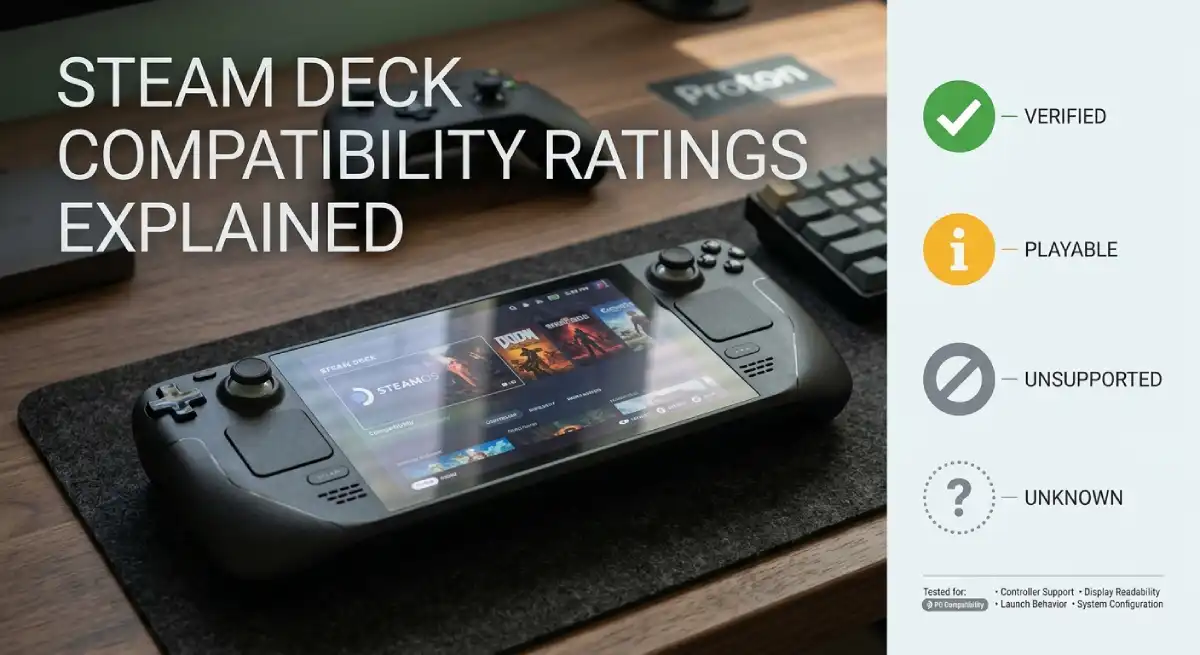
Steam Deck Verified means Valve tested the game and confirmed it runs well with no extra setup. Playable means the game works but may need a small tweak, like an on-screen keyboard for text input. Unsupported means the game failed testing or will not launch at all. Unknown simply means it has not been tested yet.
Table Of Content
- Why Valve Built This Rating System
- The Four Steam Deck Compatibility Ratings
- What Does Verified Actually Check?
- What Does Playable Mean in Practice?
- Why Some Games Are Marked Unsupported
- What Does Unknown Mean, and Will It Change?
- How to Check a Game’s Rating Before You Buy
- Do Ratings Ever Change?
- How This Compares to Other Handhelds
- Common Misconceptions About the Rating System
- Frequently Asked Questions
- Final Thoughts
If you already compared handhelds in our Steam Deck OLED vs ROG Ally X guide, read this next. Understanding these compatibility badges decides whether a game in your library actually runs the way you expect.
Why Valve Built This Rating System
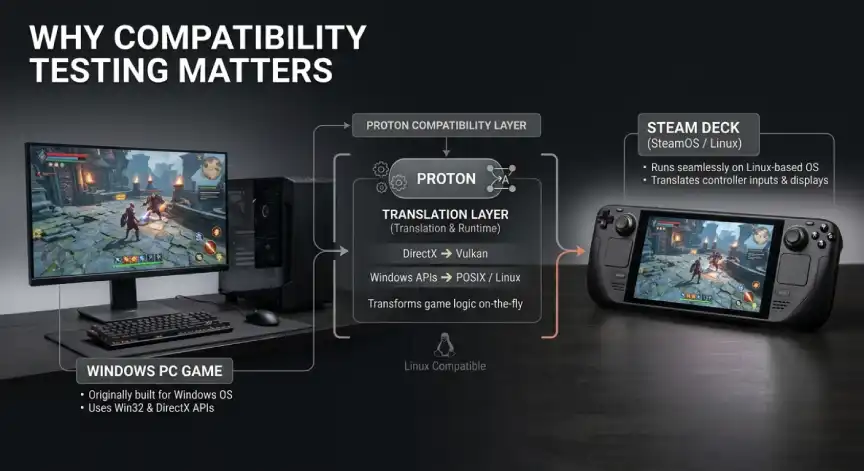
The Steam Deck runs a Linux-based operating system, while most PC games are built for Windows. Valve solved this gap with Proton, a compatibility layer that translates Windows code for Linux hardware. Even with Proton, not every game behaves the same way once translated.
Before this rating system existed, buyers had no easy way to know what would happen after clicking install. A badge system solves that by giving a clear answer before you spend any money or time. It also gives game developers direct feedback on what needs fixing for handheld players.
The Four Steam Deck Compatibility Ratings
Valve assigns every tested game one of four labels. These badges appear on the Steam Store page, in search results, and inside your library. Here is what each one signals before you click install.
- Verified: Fully playable out of the box with no configuration needed.
- Playable: Works, but may need a manual tweak or has a minor issue.
- Unsupported: Failed testing or will not run properly on the Deck.
- Unknown: Has not been tested by Valve yet.
What Does Verified Actually Check?
A Verified badge means the game passed Valve’s full testing checklist. Text is readable without zooming, the default controller layout works, and the game launches straight into gameplay. There is no need to enable Proton manually or tweak settings.
Valve checks specific technical points before granting this label. Controller inputs must map correctly and the game must display properly on the Deck’s screen. It must also avoid requiring a mouse or keyboard by default. Games that meet all of these standards earn the green checkmark.
Verified is the badge most buyers should look for first. It signals the closest thing to a console-like experience on a PC handheld. You can install a Verified title and reasonably expect it to just work.
That said, Verified does not guarantee perfect performance on every hardware configuration. Frame rates still depend on the game’s settings and the Deck’s power mode. The badge only confirms functional compatibility, not benchmark-level performance numbers.
What Does Playable Mean in Practice?
Playable games run, but they are not flawless straight out of the box. You might need to bring up the on-screen keyboard to enter your login. Some Playable titles also default to smaller text that is harder to read on a handheld screen.
This rating does not mean a game is broken. It simply means Valve found one or two rough edges during testing. Most players can still enjoy Playable titles with a small amount of manual adjustment.
Common Playable issues include awkward default controller prompts that still show keyboard icons. A game might also need you to manually launch a companion app or activate a specific Proton version. None of these fixes require advanced technical knowledge.
Many experienced Deck owners actually prefer Playable titles once they know the quirks. The extra setup usually takes less than a minute the first time. After that, the game behaves normally on every future launch.
Why Some Games Are Marked Unsupported
Unsupported does not always mean a game is unplayable in every situation. It often means the game relies on anti-cheat software that does not work with the Deck’s Linux-based system. Some Unsupported titles also require a mouse and keyboard with no practical way to use a controller.
Community members sometimes report that certain Unsupported games actually run fine for them. Valve’s testing process still marks them this way if the official experience does not meet its bar. If you want a second opinion, community sites like ProtonDB track real-world results from other players.
Live-service multiplayer games are the most common source of Unsupported labels. Anti-cheat systems designed for Windows often block Linux-based devices entirely, including the Steam Deck. This is a publisher decision, not something Valve or the Deck’s hardware can fix on its own.
Older single-player games sometimes land in this category too, usually for smaller reasons. A game might assume a full keyboard is always available for menu navigation. In many of these cases, a workaround from the community can restore full functionality.
What Does Unknown Mean, and Will It Change?
Unknown simply means Valve has not tested that particular game yet. It carries no judgment about quality either way. Thousands of new titles and updates are released on Steam constantly, so testing takes time to catch up.
Valve continues expanding its testing coverage every month. A game marked Unknown today could become Verified or Playable after a future review. Checking back periodically is worth it if a specific title interests you.
How to Check a Game’s Rating Before You Buy
You can see a title’s rating directly on its Steam Store page before purchasing. Look for the compatibility icon near the top of the listing, close to the price and platform tags. Steam also lets you filter your existing library by rating at store.steampowered.com/steamdeck/mygames.
For extra confidence, cross-reference the badge with ProtonDB before buying anything expensive. This community-driven database shows real player reports using a separate Platinum, Gold, Silver, and Bronze scale. Combining both sources gives you a clearer picture than either one alone.
It is also worth checking ratings again after a major Steam Deck system update. Valve occasionally improves compatibility for entire groups of games at once through these updates. A quick recheck before a big gaming session can save you a frustrating surprise.
Do Ratings Ever Change?
Yes, and this trips up a lot of Deck owners. A game’s rating can shift after a software update, either for the Deck itself or for the game. Valve has stated its review process stays ongoing as new updates continue to roll out.
This means a game marked Unsupported six months ago might run fine today. It also means a Verified title could occasionally develop issues after a major patch. Checking the current badge before a big play session is a smart habit.
How This Compares to Other Handhelds
Other Windows-based handhelds, like the ROG Ally, do not use this same four-tier badge system. Since they run standard Windows, most PC games install and launch without a compatibility check. The trade-off is that Windows handhelds skip Valve’s testing layer entirely. Problems only surface after you try a game yourself.
This is one of the clearest differences from the Windows handheld approach. Valve’s system front-loads the guesswork before you spend time installing anything. Windows-based devices leave that discovery process entirely up to the player.
Neither approach is strictly better in every situation. Steam Deck buyers get more certainty before installing a game. ROG Ally and similar Windows handhelds trade that certainty for broader day-one compatibility with brand-new PC releases.
Common Misconceptions About the Rating System
A lot of players assume Unsupported always means completely broken. In reality, it is often a strict pass-or-fail decision based on a handful of specific tests. A game can fail one test yet still run smoothly for most people.
Another common misconception is that Verified guarantees the best possible visual settings. The badge only confirms the game launches and controls correctly by default. You may still want to adjust graphics settings manually for better battery life or smoother frame rates.
Some players also assume the rating is permanent once assigned. As covered above, ratings shift as Valve retests titles and as game updates roll out. Treat the badge as a helpful snapshot rather than a permanent guarantee.
Frequently Asked Questions
What does Steam Deck Verified mean?
Verified means Valve tested the game and confirmed it runs correctly with no extra setup required. Controls, display, and text input all work by default.
What is the difference between Verified and Playable?
Verified games work perfectly out of the box, while Playable games run but may need a small manual adjustment. Both are considered fully playable overall.
What does Unsupported mean on Steam Deck?
Unsupported means the game either failed Valve’s testing or cannot run properly on the handheld. This is often caused by anti-cheat software or mouse-only controls.
How do I know if a game works on Steam Deck?
Check the compatibility badge on the game’s Steam Store page or inside your library. You can also check ProtonDB for additional community testing results.
Does Verified mean a game runs perfectly forever?
Not necessarily, since ratings can change after software or game updates. It is worth rechecking the badge if you have not launched a title in a while.
Can Unsupported games still work on Steam Deck?
Sometimes, especially if the issue is minor or has since been patched. Community reports on ProtonDB can help confirm whether it is worth trying anyway.
Should I only buy games that are Verified?
Not necessarily, since Playable games work fine with minimal extra effort. Sticking to Verified titles is safest for beginners who want zero setup.
Final Thoughts
Steam Deck compatibility ratings exist to save you from guessing whether a game will actually run. Verified and Playable cover the vast majority of your Steam library without much fuss. Unsupported and Unknown just need a quick check before you commit to installing something new.
Treat this rating system as a starting point rather than the final word. Combine the official badge with a quick ProtonDB search for anything you are unsure about. That small habit will save you far more frustration than skipping the check entirely.
For more handheld buying advice, browse our Gaming category for the latest guides and comparisons.






No Comment! Be the first one.