





Kubernetes Cost Optimization Guide: Rightsize Pods, Scale Smarter, and Control Cloud Spend
Kubernetes bills grow quietly. Learn to measure waste, rightsize pods, and set up autoscaling that saves money.
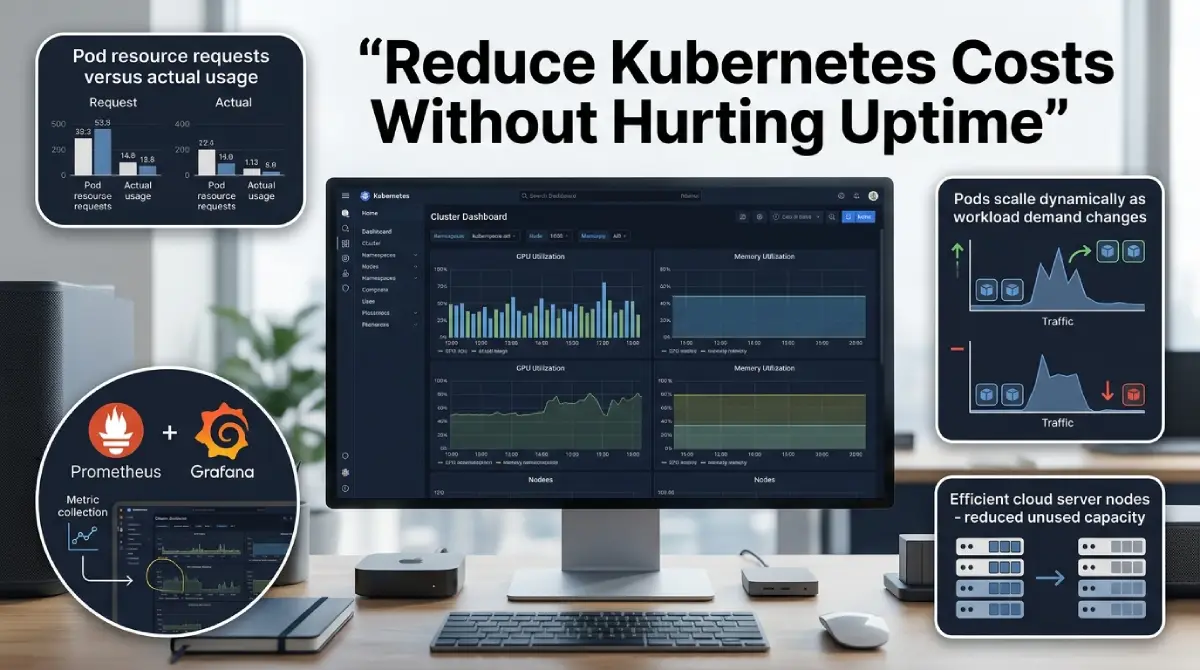
Your Kubernetes bill rarely jumps in a single day. It creeps up a little each sprint until finance starts asking questions. Most teams do not have a traffic problem. They have a sizing problem.
Table Of Content
- Why Kubernetes Bills Grow Faster Than Traffic
- Step One: Monitor Before You Cut Anything
- Rightsize Pods With Better Requests and Limits
- A Practical K8s Autoscaling Guide: Three Layers That Work Together
- Hunt Down Idle and Forgotten Workloads
- Cut Cloud Spend With Smarter Node Choices
- Build a FinOps Habit Around Your Cluster
- A 30 Day Plan to Reduce Kubernetes Costs
- Common Mistakes That Bring Costs Back
- Frequently Asked Questions
- Final Thoughts
This guide shows how to reduce Kubernetes costs without hurting uptime. You will learn what to measure, how to size workloads, and how to set up autoscaling. Each step builds on the one before it. Skip ahead only if you already track spend per namespace.
This is a full Kubernetes cost optimization loop, from monitoring to autoscaling. The goal is steady savings, not a one-time cleanup. Teams that treat cost as a daily metric keep their gains. Teams that treat it as a project often watch the bill climb back.
Why Kubernetes Bills Grow Faster Than Traffic
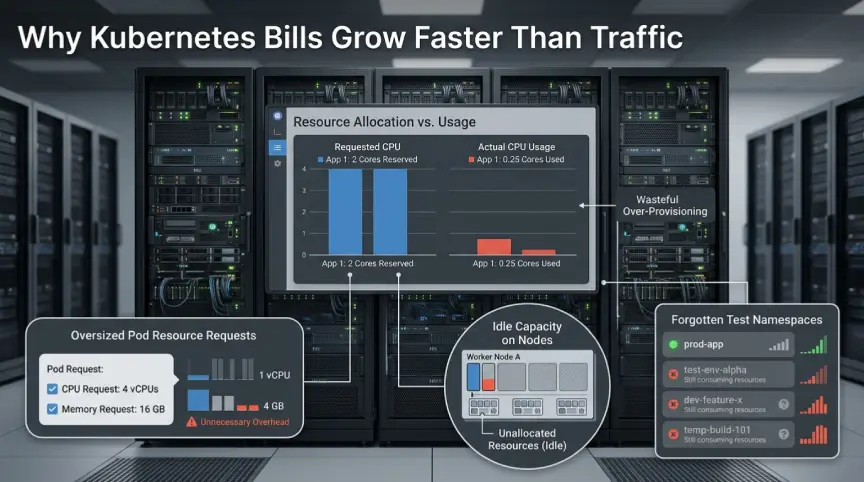
Kubernetes schedules pods by their resource requests, not their real usage. Say a pod asks for two CPU cores. It uses a quarter of one, yet the cluster still reserves two. You pay for the whole node, so that unused space is real money.
Idle capacity piles up in a few common ways. Developers copy requests from an old manifest and never revisit them. Teams add big safety margins just in case. Test namespaces keep running long after the project ends.
Node shape is another cause. A cluster full of large nodes with a few small pods wastes memory and CPU. Fragmentation gets worse as workloads change. Without a regular review, nobody notices until the invoice arrives.
Step One: Monitor Before You Cut Anything
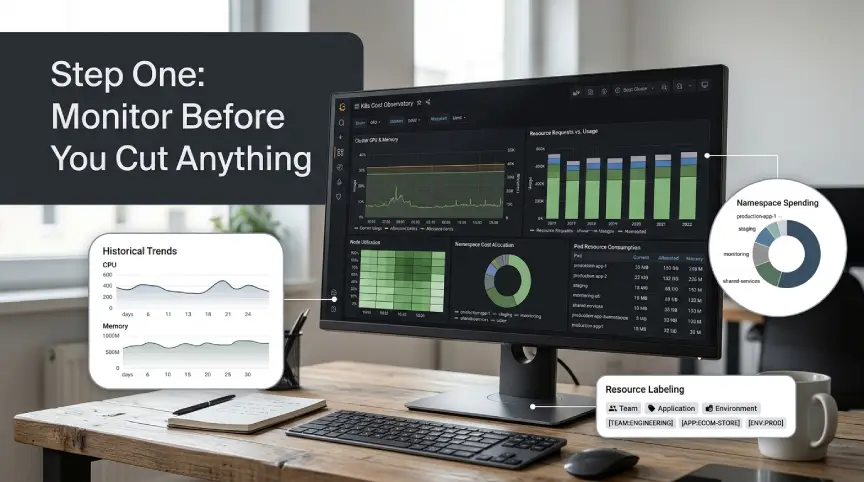
You cannot fix what you cannot see. Anyone who wants to reduce Kubernetes costs should begin with data, not guesses. Start by comparing requested resources with used resources for every workload. The gap between those two numbers is your savings opportunity.
Prometheus and Grafana give you most of what you need. Track container CPU and memory usage over at least two weeks. Include a full business cycle, such as month-end jobs or weekly batch runs. A short window hides the spikes that cause outages after a cut.
Next, add a cost layer on top of the metrics. OpenCost, a CNCF project, maps cluster spend to namespaces, labels, and teams. Kubecost offers a similar view with extra reports. Both tools turn raw cloud spend into numbers an engineer can act on.
Labels matter more than most people expect. Tag every workload with a team, an app name, and an environment. Without labels, shared cluster costs become a mystery. With labels, you can show each team its own bill.
Metrics Worth Putting on Your Dashboard
A good dashboard stays small. Too many charts hide the few numbers that drive decisions. These are the ones to start with:
- Requested CPU and memory versus actual usage, per workload
- Idle cost, meaning paid capacity that no pod uses
- Cost per namespace, team, and environment
- Node utilization across the cluster
- Pods stuck in pending or restarting often
Review these weekly at first. Once the numbers settle, a monthly check is enough. Keep the dashboard where engineers already look, such as a shared Grafana board.
Rightsize Pods With Better Requests and Limits
Pod rightsizing is the fastest win in most clusters. Requests tell the scheduler how much to reserve. Limits cap what a container may use at runtime. Good Kubernetes resource limits start with knowing this difference.
A simple rule works well for CPU. Set the request near the 90th percentile of real usage. Many teams keep the CPU limit generous, or skip it for latency-sensitive services. CPU throttling can slow a healthy app even when the node has spare cycles.
Memory needs more care. Set the memory request and limit close together, with a margin above peak usage. A container that crosses its memory limit is killed with an OOMKilled error. That restart costs you more than a slightly larger request would.
The Vertical Pod Autoscaler can help here. Run it in recommendation mode first, so it suggests values without changing pods. Review its advice, then apply the numbers through your normal deploy process. This keeps humans in control while removing guesswork.
Add guardrails so waste does not return. A LimitRange sets default requests for pods that skip them. A ResourceQuota caps total usage per namespace. Together they stop one careless manifest from draining the budget.
A Practical K8s Autoscaling Guide: Three Layers That Work Together
Autoscaling can reduce Kubernetes costs a lot when it is tuned well. It works in layers, with pods first and nodes after. If one layer is off, the others cannot save you. This k8s autoscaling guide covers each layer in order.
| Layer | Common tool | What it does |
|---|---|---|
| Visibility | OpenCost, Kubecost | Maps spend to teams and apps |
| Pod sizing | Vertical Pod Autoscaler | Suggests better requests |
| Pod scaling | HPA, KEDA | Adds or removes replicas |
| Node scaling | Cluster Autoscaler, Karpenter | Adds or removes nodes |
Horizontal Pod Autoscaler
The horizontal pod autoscaler adds or removes pod replicas based on metrics. CPU is the default signal, but memory and custom metrics also work. Set a target near 60 to 70 percent CPU so there is headroom for spikes. Always define a sensible minimum and maximum replica count.
Avoid running HPA and VPA on the same metric for the same workload. They can fight each other and cause constant churn. A common pattern is HPA for scaling and VPA in recommendation mode only. Keep it boring and predictable.
Event-Driven Scaling With KEDA
Some workloads do not follow CPU at all. Queue consumers should scale on queue length instead. KEDA connects Kubernetes scaling to sources like Kafka, SQS, and Prometheus queries. It can also scale a workload down to zero when nothing is waiting.
Cluster Autoscaler and Karpenter
Pods need nodes, and nodes cost money. The cluster autoscaler adds nodes when pods cannot be scheduled. It removes nodes that stay underused for a set period. Tune the scale-down delay so you do not keep idle nodes for hours.
Karpenter, popular on AWS, takes a different approach. It launches nodes sized to fit pending pods, rather than relying on fixed node groups. This often cuts fragmentation and speeds up scaling. Check that your provider and version support it before you plan around it.
Hunt Down Idle and Forgotten Workloads
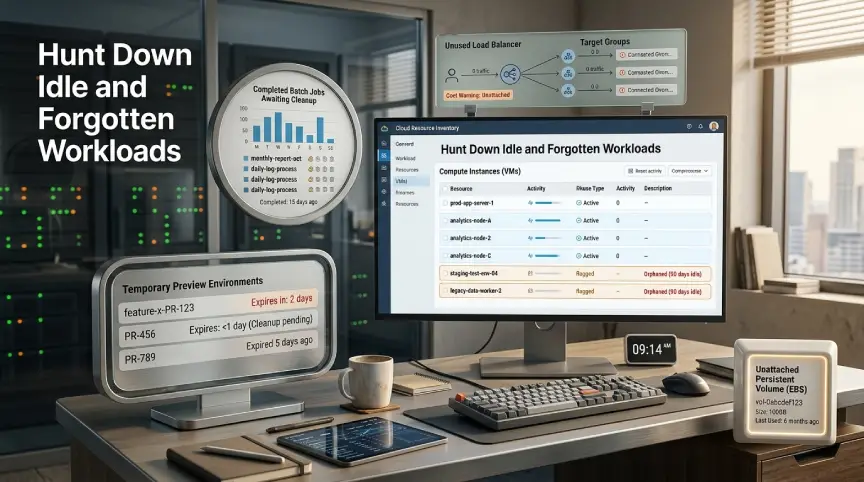
Every cluster hides forgotten workloads. Old preview environments, abandoned demos, and failed jobs still hold resources. Search for namespaces with no recent deploys and no traffic. Ask the owning team before you delete anything.
Use a time-to-live on short-lived environments. Pull request previews should expire after a few days. Kubernetes can clean up finished jobs on its own with a TTL setting. This habit removes clutter without any manual chasing.
Look at idle load balancers and unused persistent volumes next. Each one bills by the hour, even with zero traffic. A weekly report of orphaned resources makes cleanup routine. Over time, it also teaches teams to tidy up after themselves.
Cut Cloud Spend With Smarter Node Choices
Once pods are rightsized, node choice can reduce Kubernetes costs even more. Spot or preemptible instances cost far less than on-demand ones. They suit stateless services, batch jobs, and CI runners. Cloud providers can reclaim them on short notice, so plan for that.
Use PodDisruptionBudgets and several instance types to stay safe on spot. Spread replicas across zones so one reclaim does not take down a service. Keep critical databases and control services on stable nodes. Mix capacity types instead of going all in.
Commitments help for your steady baseline. Savings plans and reserved instances lower the price of capacity you will always use. Buy them only after rightsizing, or you will lock in waste. Start with a conservative share of your baseline and grow it later.
Do not forget storage and network. Unattached volumes, old snapshots, and oversized disks quietly add up. Cross-zone traffic and NAT gateway fees can surprise you as well. Check these lines on your cloud bill each month.
Build a FinOps Habit Around Your Cluster
Tools alone will not keep costs down. FinOps is the practice of sharing cost ownership between engineering, finance, and product. In Kubernetes, that means every team sees its own spend and owns its choices.
Set a monthly review with a short, fixed agenda. Look at cost per namespace, idle capacity, and the ten most wasteful workloads. Agree on two or three actions and assign owners. Small, steady fixes beat big cleanups.
Add cost checks to your pipeline too. Fail a deploy if a manifest has no requests or no team label. Alert when a namespace crosses its monthly budget. These small gates catch problems before they reach production.
Track a few unit metrics, such as cost per request or cost per customer. Total spend can rise for good reasons, like growth. Unit cost tells you whether the platform is getting more efficient.
A 30 Day Plan to Reduce Kubernetes Costs
Do not try to do everything at once. Each week below has one clear goal. Follow the order, because each step feeds the next.
- Week one: Install OpenCost or Kubecost, add labels, and collect usage data.
- Week two: Review the twenty most wasteful workloads and fix their requests.
- Week three: Turn on HPA where it fits and tune the cluster autoscaler.
- Week four: Move safe workloads to spot, add quotas, and start the monthly review.
Measure the bill after each week. Share the wins with the team. Visible progress keeps people engaged.
Common Mistakes That Bring Costs Back
The first mistake is cutting too deep, too fast. Set requests too low and pods get evicted or throttled. Make changes in small steps and watch error rates after each one.
The second mistake is ignoring non-production clusters. Dev and staging often run all night and all weekend. Schedule them to scale down outside work hours. This single change can trim a real share of the monthly bill.
The third mistake is treating this as a one-time job. Workloads change, teams grow, and old settings go stale. Reviewing monthly keeps the savings in place. Teams that want to reduce Kubernetes costs for good need this routine.
The fourth mistake is hiding cost data from engineers. People cannot improve numbers they never see. Share dashboards openly and celebrate savings. Culture drives results as much as tooling does.
Frequently Asked Questions
How much can I save by rightsizing?
Results vary by cluster. Teams with no prior tuning often find large gaps between requested and used resources. Measure your own gap first, then set a goal from real numbers.
Should I set CPU limits on every pod?
There is no single answer. Many teams set requests on everything and skip CPU limits for latency-sensitive services. Memory limits are still a good idea.
Is spot capacity safe for production?
It can be, for the right workloads. Use stateless services, several replicas, and disruption budgets. Keep stateful systems on stable nodes.
Final Thoughts
To reduce Kubernetes costs, measure first, right-size second, and automate third. Then keep the habit alive with monthly reviews. Small, repeated fixes add up to a lasting drop in your cloud spend.
Running AI workloads on the same cluster? The same steps apply. GPU nodes are costly, so idle time hurts even more. Start with visibility, and the rest gets easier.


No Comment! Be the first one.