





Best Infrastructure as Code Tools for 2026: Terraform, Pulumi, and Cloud Automation Platforms Compared
A practical look at the best infrastructure as code tools for 2026. Compare Terraform, Pulumi, CloudFormation, and Ansible on pricing, setup, and cloud provider support before choosing your...
Terraform remains the most popular choice among the best infrastructure as code tools, mainly because it works across almost every cloud provider without vendor lock-in. Pulumi is a strong alternative for teams that prefer writing infrastructure in a familiar programming language instead of a separate configuration syntax. CloudFormation fits teams already fully committed to AWS.
Table Of Content
This guide compares these tools along with Ansible, covering pricing, setup difficulty, and the type of team each one suits best. Infrastructure as code turns manual server setup into repeatable, version-controlled configuration. Picking the right tool early saves significant rework as your infrastructure grows.
Key Takeaways
- Terraform works across multiple cloud providers with a large community.
- Pulumi lets teams write infrastructure code in familiar languages like Python.
- CloudFormation suits teams fully committed to the AWS ecosystem.
- Ansible works well for configuration management alongside infrastructure provisioning.
- Choose based on your cloud provider strategy and your team’s language preferences.
Why the Best Infrastructure as Code Tools Matter
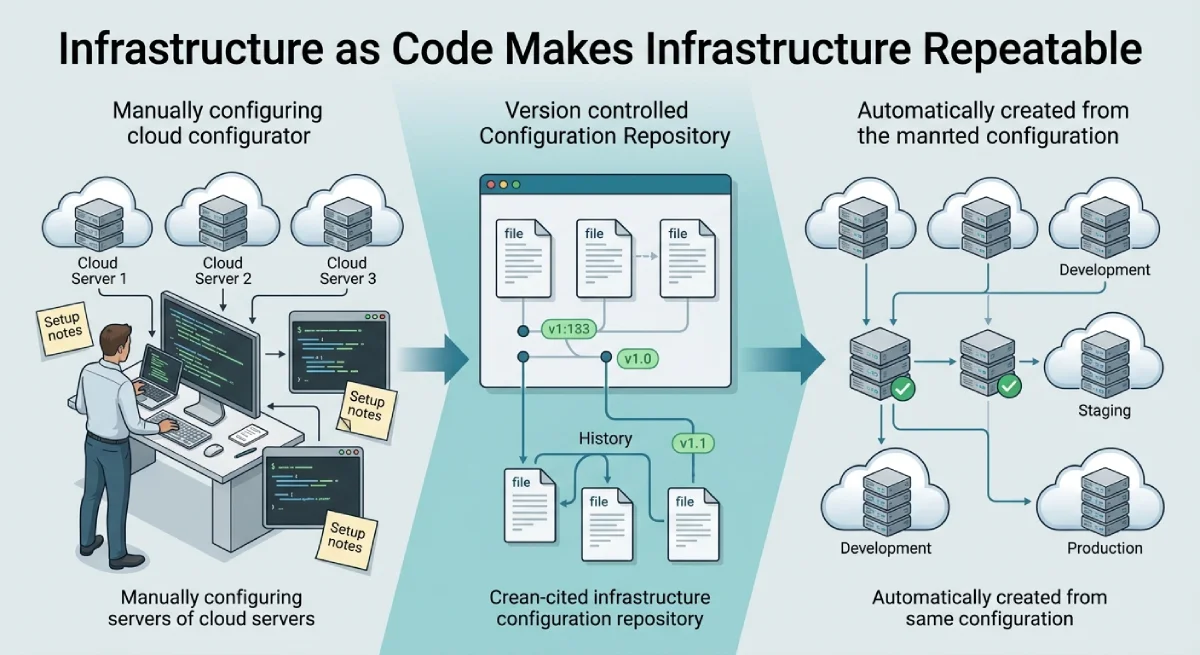
Manually configuring servers leads to inconsistent environments and hard-to-trace errors. One server might have a setting another does not, causing bugs that only appear in production. Infrastructure as code solves this by making every environment reproducible from the same configuration files.
This matters more as teams grow. A single engineer can remember manual setup steps for one server. Once a team manages dozens of services across multiple environments, that manual approach becomes unreliable and slow. Reliable infrastructure automation tools remove this risk by keeping configuration consistent and version-controlled.
Version control also brings accountability to infrastructure changes. Every update becomes a tracked, reviewable change instead of an untracked manual edit. This makes rollbacks faster and audits far easier during compliance reviews.
Teams that adopt infrastructure as code early also onboard new engineers faster. A new hire can read configuration files to understand the entire infrastructure setup, instead of relying on tribal knowledge passed between team members. This documentation benefit often matters as much as the automation itself.
What to Look for Before Choosing
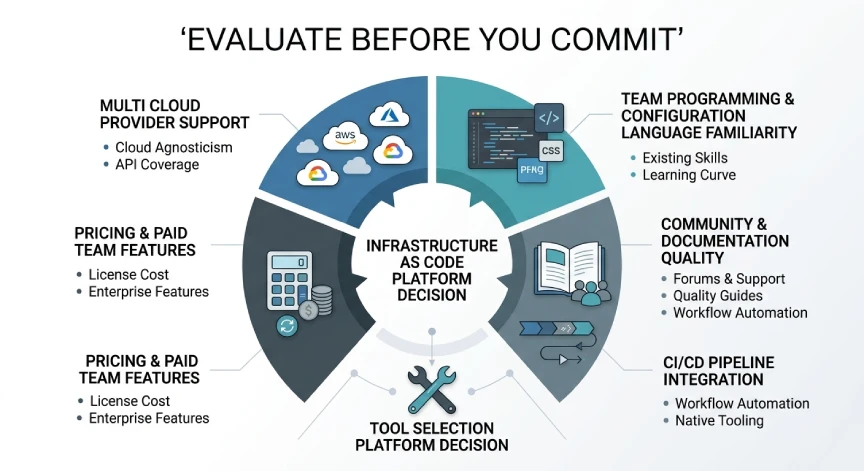
Not every infrastructure-as-code tool fits every cloud strategy. Review these factors before committing to one:
- Support for your current and planned cloud providers
- Team familiarity with the tool’s configuration language
- Community size and quality of available documentation
- Integration with your existing CI/CD pipeline
- Pricing model, including any paid tiers for team features
Skipping this review often leads teams to adopt a tool that fights against their existing workflow. A short evaluation period avoids months of friction later.
Best Infrastructure as Code Tools Compared
This section breaks down each tool by strengths, weaknesses, and ideal use case.
Terraform
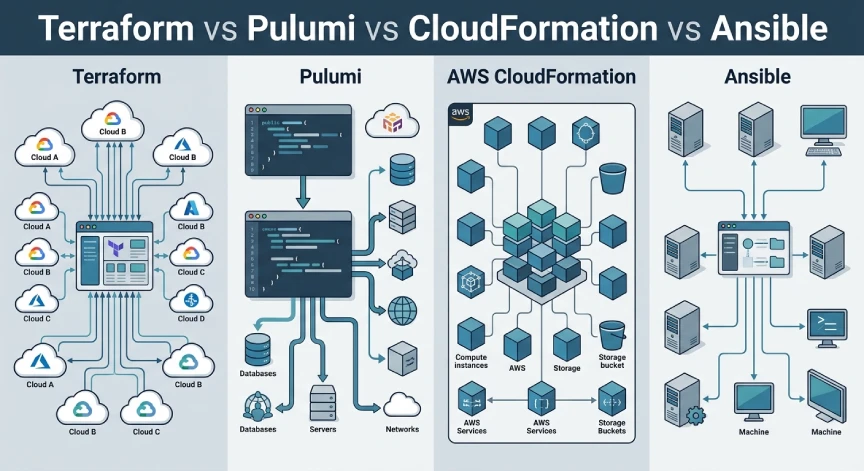
Terraform remains the leading choice among infrastructure as code tools due to its broad cloud provider support. It uses its own configuration language, which is straightforward to learn for most developers. A massive library of community modules covers most common infrastructure patterns already.
The learning curve is manageable, though very complex setups can produce large, hard-to-read configuration files. Terraform state management also requires care, since mismanaged state files can cause deployment errors. Most teams solve this by storing state remotely with proper access controls.
Terraform also supports a plan step before applying any change, showing exactly what will be created, modified, or destroyed. This preview step catches mistakes before they reach production, which many teams consider one of Terraform’s strongest safety features.
Pulumi
Pulumi stands out by letting teams write infrastructure code in general-purpose languages like Python, TypeScript, or Go. This appeals to teams that prefer avoiding a separate configuration language entirely. Existing programming skills transfer directly into infrastructure work.
This flexibility comes with a smaller community compared to Terraform. Fewer prebuilt modules exist, meaning teams sometimes write more custom code for common patterns. Teams with strong existing developers often see this as a fair tradeoff for using familiar languages.
Pulumi also integrates naturally with existing testing frameworks in each supported language. Developers can write unit tests for infrastructure code the same way they test application code. This appeals strongly to engineering-heavy teams that value consistent testing practices across their entire codebase.
CloudFormation
CloudFormation is AWS native, integrating deeply with every AWS service without extra configuration. Teams fully committed to AWS benefit from this tight integration and official support. No separate tool installation is required, since it runs directly through AWS.
The clear limitation is vendor lock-in. CloudFormation configurations only work within AWS, so multi-cloud strategies require a different tool entirely. Teams planning to stay on AWS long term rarely see this as a dealbreaker.
CloudFormation also benefits from official AWS support channels, which some teams value over community-driven support alone. Updates to new AWS services often appear in CloudFormation support quickly, since both are maintained by the same company.
Ansible
Ansible focuses more on configuration management than pure infrastructure provisioning, though it handles both reasonably well. It uses readable YAML files instead of a programming language, making it approachable for teams without deep coding experience. Setup for basic use cases is fast.
Ansible works particularly well alongside Terraform, handling server configuration after Terraform provisions the infrastructure. Many teams use both tools together rather than choosing one exclusively. This combination covers both provisioning and configuration in one workflow.
Ansible also requires no agent installed on managed servers, connecting instead through standard SSH access. This lowers the setup barrier considerably for teams new to configuration management. Many smaller teams start with Ansible specifically for this reason before adding more complex tools later.
Infrastructure as Code Tools Comparison Table
| Tool | Best For | Pricing | Setup Difficulty |
|---|---|---|---|
| Terraform | Multi-cloud provisioning | Free, paid tiers available | Moderate |
| Pulumi | Teams preferring real code | Free, paid tiers available | Moderate |
| CloudFormation | AWS-only environments | Free, included with AWS | Low to moderate |
| Ansible | Configuration management | Free, open source | Low |
Key Terms in Infrastructure as Code
A few terms come up often when comparing these tools. Understanding them helps evaluate each option with more confidence.
- Provisioning creates and configures infrastructure like servers and networks.
- A state file tracks the current configuration of your infrastructure.
- Idempotency means running the same configuration repeatedly produces the same result.
- Module packages reusable infrastructure configuration for common patterns.
- Drift occurs when actual infrastructure no longer matches the code that defines it.
Understanding these terms speeds up conversations between developers and DevOps engineers. It also helps when reading documentation across different infrastructure-as-code platforms.
How to Choose the Right Tool
Match your choice to your cloud provider strategy first. Multi-cloud teams benefit most from Terraform or Pulumi, while AWS-only teams may prefer CloudFormation for tighter integration. This single factor eliminates several options quickly.
Consider your team’s existing programming skills as well. Teams with strong developers may prefer Pulumi, while teams that want a simpler, dedicated syntax often choose Terraform. Neither choice is wrong, but matching the tool to your team reduces onboarding time significantly.
Test your chosen tool on a small, low-risk project first. This reveals real setup friction before committing your entire infrastructure to one platform. Most teams find this trial period clarifies the decision faster than reading comparisons alone.
Revisit your choice periodically as your infrastructure grows in scale and complexity. A tool chosen for five servers may feel limiting once that number reaches fifty. Planning for this shift early makes any future migration far smoother than an unplanned rebuild.
Frequently Asked Questions
What are the best infrastructure as code tools for small teams?
Terraform and Ansible are strong starting points for small teams. Both are free, well-documented, and widely supported across cloud providers.
Is Pulumi better than Terraform?
Pulumi suits teams that prefer writing infrastructure in real programming languages. Terraform has a larger community and more prebuilt modules for common patterns.
Can Ansible replace Terraform?
Ansible focuses on configuration management, while Terraform focuses on provisioning infrastructure. Many teams use both together rather than choosing one over the other.
Is CloudFormation only for AWS?
Yes, CloudFormation only works within the AWS ecosystem. Teams needing multi-cloud support should choose Terraform or Pulumi instead.
How long does it take to learn infrastructure as code tools?
Basic Terraform or Ansible skills can be learned within a few days for developers with some scripting background. Mastering advanced patterns typically takes a few months of regular use.
Conclusion
Choosing among the best infrastructure as code tools depends mostly on your cloud strategy and team skills. Terraform remains the safest general choice for multi-cloud flexibility. Pulumi and CloudFormation fit more specific situations, while Ansible pairs well alongside any of them.
Start with the tool that matches your current infrastructure, not a future you have not built yet. You can always add another tool to your stack as needs change. Consistent, version-controlled infrastructure matters more than which specific IaC platform you choose first. Whatever you pick from this comparison, treat it as a starting point rather than a permanent decision.
Want more guides like this? Explore the full Cloud and DevOps collection on TechAndTrends to build infrastructure that scales with your team.



No Comment! Be the first one.