





Multi-Factor Authentication for Small Businesses: What Actually Works in 2026
Not all multi-factor authentication methods for small businesses offer the same protection. This guide breaks down which MFA options actually stop attacks, which ones fall short, and how to roll MFA...

Multi-factor authentication for small businesses means requiring more than just a password to log in. A second step, like a code from an app or a tap on a phone, is added before access is granted. Not every version of this works equally well, and that gap matters more than most owners realize.
Table Of Content
- What Is Multi-Factor Authentication for Small Businesses?
- Why “What Actually Works” Is the Right Question
- Why Small Businesses Are Prime Targets for Credential Attacks
- MFA Methods Compared
- How to Roll Out MFA Without Disrupting Your Team
- Common MFA Mistakes Worth Avoiding
- What This Means for Cost and Risk
- Frequently Asked Questions
- Which MFA Method to Pick First
Some MFA methods block the vast majority of automated login attacks. Others sound secure but leave real gaps attackers already know how to exploit. Knowing the difference is what separates real protection from a checkbox that just feels safe.
What Is Multi-Factor Authentication for Small Businesses?
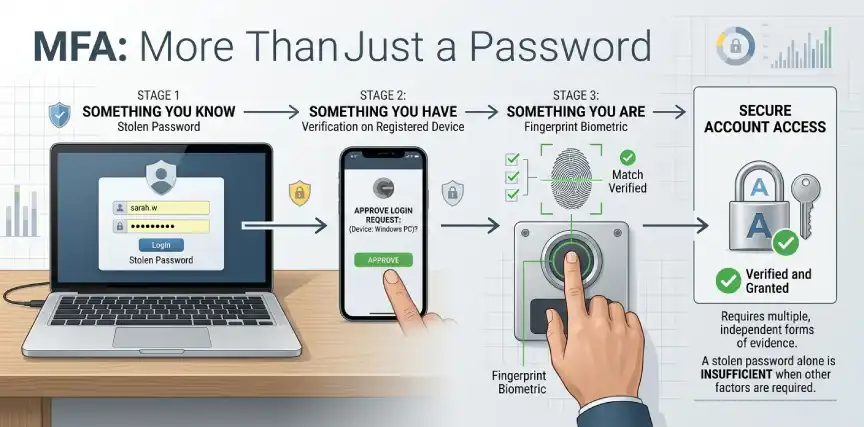
MFA simply means proving who you are in more than one way before getting into an account. Usually this combines something you know, like a password, with something you have, like a phone or security key. Some setups add a third factor, something you are, like a fingerprint.
The idea is straightforward. If a password gets stolen through phishing or a data breach, the attacker still cannot get in without that second factor. This single addition blocks the overwhelming majority of automated credential attacks that small businesses face every day.
Not all MFA is created equal, though. The method used to deliver that second factor changes how well it actually holds up against a determined attacker.
Why “What Actually Works” Is the Right Question
Plenty of small businesses already have some form of MFA turned on somewhere. The problem is that many are relying on the weakest version available without realizing it.
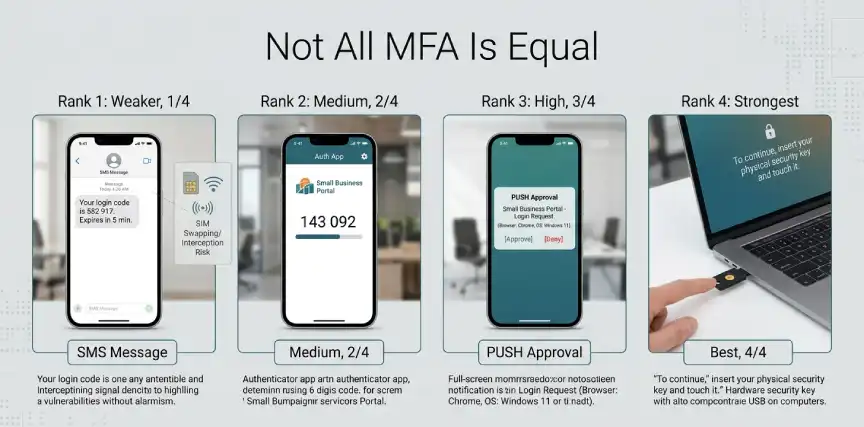
Text message codes, for example, feel modern and are better than nothing at all. But SIM swapping and message interception attacks specifically target this exact method, and attackers have gotten good at it. A business that only uses SMS codes for its most sensitive accounts is protected against casual attacks, not sophisticated ones.
This matters because credential theft remains one of the top ways small businesses get breached. If you already looked into shadow AI risks for small businesses, you know how easily a single leaked login can expose far more than one system. Choosing the right MFA method is not a minor technical detail. It is often the difference between stopping an attack cold and simply slowing it down for a few extra minutes.
Why Small Businesses Are Prime Targets for Credential Attacks
Attackers rarely break in through some clever technical exploit. Most of the time, they simply log in using a password that was leaked, guessed, or handed over through a convincing phishing email. Small businesses are attractive targets precisely because this kind of attack scales easily and needs almost no customization.
Automated tools now test millions of stolen username and password combinations against business logins every single day. A business with no second verification layer offers no resistance once the correct password is found. This is exactly why security researchers consistently point to weak or absent MFA as one of the most preventable causes of small business breaches.
The uncomfortable truth is that most owners assume their business is too small to interest an attacker. Automated attacks do not care about company size. They care about which accounts are easiest to unlock, and a bare password is about as easy as it gets.
MFA Methods Compared
Here is how the most common MFA methods actually stack up against each other.
| Method | Security Level | Typical Cost | Best For |
|---|---|---|---|
| SMS text codes | Moderate | Free to low cost | Basic protection, better than nothing |
| Authenticator app | Strong | Free | Most small business accounts |
| Push notification | Strong | Often included for free | Teams wanting quick, easy approval |
| Hardware security key | Very strong | One-time device cost | Admin accounts, financial systems |
| Biometric | Strong | Built into most devices | Device-level access, laptops and phones |
Authenticator apps and push notifications hit a sweet spot for most small businesses. They are far stronger than text codes and cost nothing extra with most existing software plans. Hardware keys offer the strongest protection available and are worth the small added cost for admin logins, banking access, and anything tied to sensitive financial systems.
How to Roll Out MFA Without Disrupting Your Team
Rolling out MFA badly is one of the fastest ways to get employees quietly working around it. A phased approach avoids that problem almost entirely.
- Start with your highest-risk accounts. Email, banking, admin panels, and cloud storage should get MFA first, since these carry the most damage potential if compromised.
- Choose an authenticator app over text messages where possible. Free apps like Google Authenticator or Microsoft Authenticator already provide much stronger protection than SMS codes.
- Give employees a short, clear walkthrough. A five-minute demo removes most confusion and prevents a flood of support questions later.
- Allow a brief grace period for setup. Forcing an overnight switch tends to create frustration and workarounds. A short transition window keeps adoption smooth.
- Add hardware keys for your most sensitive accounts. Owners, finance staff, and system administrators benefit most from this extra layer.
- Review coverage regularly. New employees, new tools, and new accounts should get folded into your MFA policy automatically, not as an afterthought.
Teams already tightening their cybersecurity tools for small businesses usually find MFA is the fastest, cheapest upgrade on the entire list. It also tends to satisfy a growing number of requirements insurers now ask about during cyber insurance audits, which can directly affect premiums and coverage terms.
Common MFA Mistakes Worth Avoiding
A few recurring mistakes quietly undercut MFA rollouts even when the intention behind them was good.
Relying only on SMS codes for critical accounts. It is better than no MFA at all, but it should not be the only layer protecting your most important systems.
Skipping admin and shared accounts. These are often the most valuable targets, yet they get overlooked because nobody personally “owns” them.
Treating MFA setup as optional for busy employees. A policy that allows exceptions quickly becomes a policy nobody actually follows.
Never revisiting the policy after initial setup. New tools and new hires need to be added to MFA coverage as the business grows, not left as a one-time project.
What This Means for Cost and Risk
MFA is one of the rare security upgrades that costs almost nothing and delivers an outsized return. Most of the strongest methods, like authenticator apps, are already included in software the business likely owns.
The real cost of skipping proper MFA shows up after a breach, not before one. Recovery costs, notification requirements, and reputational damage from a preventable login compromise almost always outweigh the minor friction of adding a second verification step. For a small business trying to compete for security-conscious clients, having strong MFA in place can also become a quiet but genuine trust signal during vendor reviews.
None of this requires a security background to get right. Most of the work is a handful of settings changes spread across a few afternoons, not a major infrastructure project. Owners who treat MFA as a quick weekend task, rather than a drawn-out overhaul, tend to get it done and keep it maintained.
Frequently Asked Questions
What is multi-factor authentication in simple terms?
Multi-factor authentication requires more than just a password to log in, usually adding a code, app approval, or physical key as a second step.
Is SMS-based MFA safe enough for small businesses?
It offers some protection but is weaker than app-based or hardware options. It works fine for low-risk accounts but should not be the only layer on financial or admin systems.
Does MFA slow employees down significantly?
Modern methods like push notifications add only a few seconds to login. Most employees adjust within the first week and barely notice it afterward.
Which MFA method is best for a small business on a tight budget?
Authenticator apps offer strong protection at no extra cost and are usually the best starting point for budget-conscious teams.
Can MFA be bypassed by attackers?
No method is completely unbeatable, but strong MFA blocks the vast majority of automated attacks. Hardware keys currently offer the highest resistance to bypass attempts.
Does using MFA help with cyber insurance requirements?
Yes, often significantly. Many insurers now specifically ask about MFA coverage across critical accounts before issuing or renewing a policy.
Which MFA Method to Pick First
Multi-factor authentication for small businesses is not a single decision; it is a series of small, manageable ones. Starting with authenticator apps on your highest-risk accounts delivers most of the protection benefit almost immediately. Adding hardware keys for admin and financial access closes the remaining gap without a large budget.
The businesses that get breached are rarely the ones with imperfect security. They are usually the ones with no meaningful second layer at all.
Explore more practical guidance in our Business Tech section.




No Comment! Be the first one.