





LangGraph vs AutoGen: Which Should You Choose in 2026?
LangGraph vs AutoGen compared for 2026: differences in code style, control and use cases. Find which AI agent framework fits your project.

Building AI agents that work together sounds simple until you pick the wrong framework. Developers in 2026 face a real choice. LangGraph vs AutoGen is one of the most searched topics in the multi-agent space. Both tools help you build systems where AI agents work as a team.
Table Of Content
- What Is LangGraph
- What Is AutoGen
- LangGraph vs AutoGen: Core Architecture Differences
- LangGraph vs AutoGen: Ease of Use
- LangGraph vs AutoGen: Performance and Scalability
- LangGraph vs AutoGen: Key Differences at a Glance
- Real-World Use Cases
- Cost and Licensing
- Security and Reliability
- How to Migrate Between Them
- Which One Should You Choose
- Common Mistakes to Avoid
- The Future of Multi-Agent Frameworks
- What If You Already Use AutoGen?
- Frequently Asked Questions
- Conclusion
This guide breaks down the real differences between these two frameworks. We will look at architecture, control, ease of use, and performance. You will also see where each tool fits best inside real projects. This single decision can save weeks of rework later on.
What Is LangGraph
LangGraph is a framework from LangChain that lets you build AI agents as a graph. Each step in your workflow becomes a node. Edges connect the steps and set the order. The graph decides what happens next based on the current state. This design gives you more control over the flow of work.
LangGraph also keeps state between steps. If a task fails, you can resume from the last good state. This makes it useful for long-running processes that need to be reliable. Teams often use it for customer support flows, data pipelines, and multi-step research tasks.
The tool fits well inside the LangChain ecosystem. If your team already uses LangChain, adding LangGraph feels natural. This makes it a strong pick for teams already invested in that ecosystem. It also means faster onboarding for existing LangChain users. Under the hood, you build with its StateGraph API, and the framework saves state at each step through checkpointers, so a long run can pause, resume, or rewind. LangSmith is where you inspect those runs.

What Is AutoGen
AutoGen is a framework from Microsoft that lets AI agents talk to each other. Instead of a fixed graph, agents hold a conversation to finish a task. One agent might ask a question, and another agent answers it. The talk continues until the task is complete. This approach feels more open and flexible than a strict workflow.

AutoGen gives each agent a role. You might have a coder agent, a reviewer agent, and a user proxy agent. They pass messages until they reach a result. This style works well when you are not sure how the task will unfold.
Many developers like AutoGen for fast prototyping. You can set up a group of agents in a few lines of code. The conversation model makes it easy to test ideas without building a full workflow first.
LangGraph vs AutoGen: Core Architecture Differences
LangGraph uses nodes and edges to map every step in advance. You decide the path before the task runs. AutoGen uses a chat-based flow where agents decide the next step as they talk. This is the core difference between the two tools. If you want predictability, LangGraph gives you a clear map. If you want free-form problem solving, AutoGen opens up the conversation.
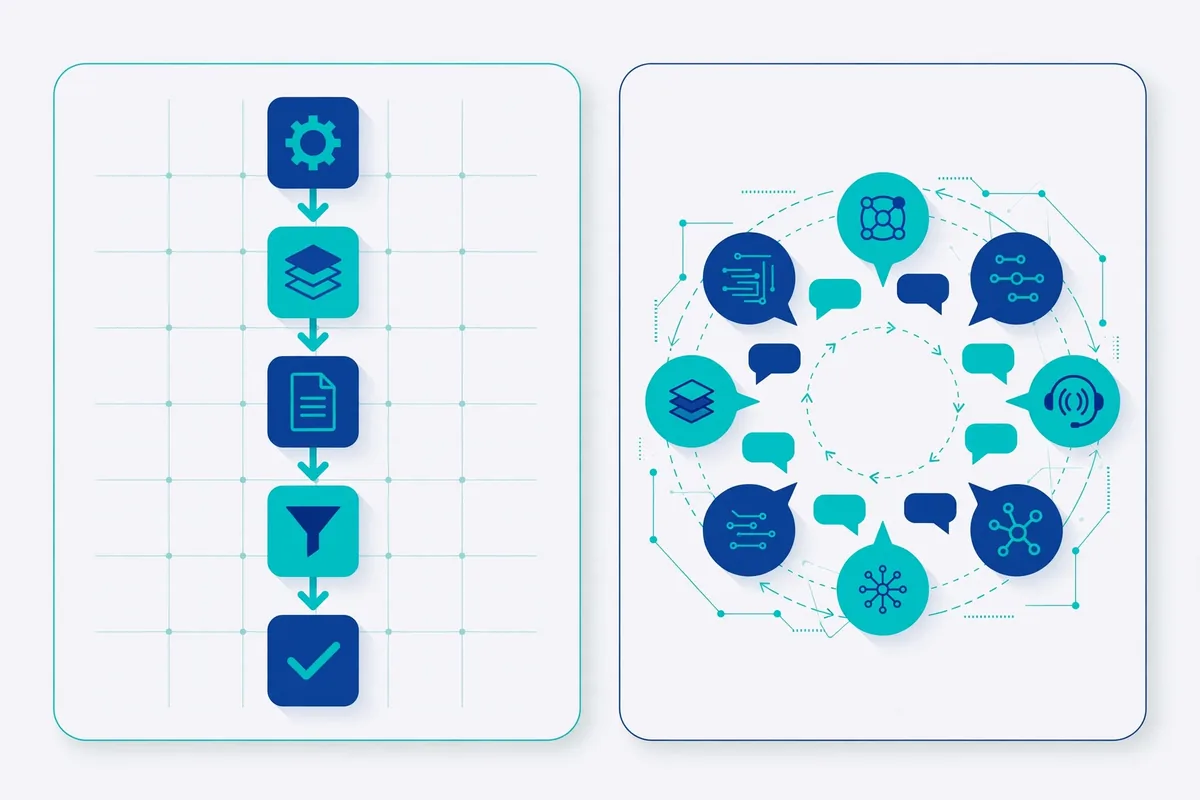
Another key difference is error handling. In LangGraph, a failed step can route to a retry node or an error handler. You can see exactly where things went wrong. In AutoGen, a failed step shows up in the conversation history. You can scroll back and see what the agents discussed before the failure.
State management also splits the two tools. LangGraph tracks state as part of the graph, so you always know the current step. AutoGen tracks state through message history, which can grow long and hard to follow. For complex tasks with many steps, LangGraph keeps the state cleaner.
LangGraph vs AutoGen: Ease of Use
LangGraph has a steeper learning curve. You need to understand nodes, edges, and state. Once you learn these ideas, the tool becomes clear. The docs include examples that help you get started.
AutoGen is easier to pick up at first. You create agents, give them roles, and let them talk. There is less setup before you see results. This makes it a good choice for beginners and quick tests.
Long-term ease of use tells a different story. LangGraph projects stay organized as they grow. AutoGen projects can get messy when conversations grow long. For larger systems, LangGraph may save you time in the long run.
LangGraph vs AutoGen: Performance and Scalability
LangGraph runs tasks in a fixed order, so it uses resources in a predictable way. You can see how long each step takes. This makes it easier to find slow parts and fix them.
AutoGen runs conversations that can take many turns. Each turn uses tokens, so costs can rise quickly. If agents talk in circles, you may spend more than you planned.
For large projects, LangGraph scales better. You can break work into smaller graphs and run them in parallel. AutoGen can also scale, but it needs more careful management of message flow.
LangGraph vs AutoGen: Key Differences at a Glance
| Feature | LangGraph | AutoGen |
|---|---|---|
| Architecture | Graph-based | Conversation-based |
| Control Level | High | Medium |
| Learning Curve | Steeper | Easier |
| Best For | Structured workflows | Open-ended tasks |
| Error Handling | Built-in checkpoints | Conversation history |
| State Management | Graph state | Message history |
Real-World Use Cases
LangGraph is used for tasks that need a clear process. Customer support teams use it to route tickets through steps. Data teams use it to run pipelines that need checks at each stage.
AutoGen is used for research and creative tasks. A group of agents might brainstorm ideas for a product launch. Another group might review code and suggest fixes. The open flow helps when the steps are not known in advance.
Some teams use both tools. They might use LangGraph to manage the main workflow and AutoGen inside one node for a brainstorming step. This mix gives you the best of both designs.
Cost and Licensing
Both LangGraph and AutoGen are free to use. They are open source, so there is no license fee. Your main cost will be the API calls to the language models you use.
LangGraph can help you control costs because you set the steps in advance. You know how many model calls each step will make. This makes it easier to estimate your monthly spend.
AutoGen costs can be harder to predict. If agents keep talking, each message adds to your bill. You should set a limit on turns to keep costs under control.
Security and Reliability
LangGraph makes security easier to manage. You can add checks at each node before data moves forward. This is useful when you handle sensitive information.
AutoGen agents talk through messages, so you need to review the full conversation to check for issues. A small mistake in a prompt can lead to unexpected agent behavior. The responsibility to audit full conversation logs falls on the development team, which can mean more review time before launch.
Both tools let you run models locally if you want more control over data. Check the security guide before you deploy any multi-agent system in production.
How to Migrate Between Them
Moving from AutoGen to LangGraph takes some work. You need to map each conversation step to a node in the graph. The logic stays the same, but the structure changes.
Moving from LangGraph to AutoGen is often easier. You can take each graph step and turn it into an agent message. The open flow of AutoGen can accept the steps without much rework.
Start small when you migrate. Move one workflow at a time and test it before you switch the next one. This keeps your system running while you make changes. If you see a broken link during the move, use a broken link checker to find it.
Which One Should You Choose
Choose LangGraph if you need a clear structure for your project. This works best for workflows with many steps that must run in a known order. It also helps when you need to track what happened at each step. If you value control and audit trails, LangGraph is the safer pick.
Choose AutoGen if your project benefits from open conversation between agents. This works well for research tasks, brainstorming, or creative work where the path is not clear. You can set up agents quickly and let them talk through the problem. You can prototype faster, though you may need extra work later. Keep in mind, though, that Microsoft has archived AutoGen, so choosing it for a new project means adopting a tool with no future updates, fixes, or support. Most new projects that want AutoGen’s conversational style are better served by its maintained successor, Microsoft Agent Framework.
Both tools can work for data analysis tasks. LangGraph gives you a clear path from data to result. AutoGen lets agents explore the data through discussion. Pick the style that matches how your team likes to work.
Common Mistakes to Avoid
One common mistake is to pick a tool before you know the task. Start by writing down what the system must do. Then choose the framework that fits those needs.
Another mistake is to ignore cost. Set a budget for model calls before you start. Add limits on turns and steps so you do not get a surprise bill.
A third mistake is to skip testing. Test each agent and each node on its own. Once you understand the pattern, you can trust the whole system to work.
The Future of Multi-Agent Frameworks
The multi-agent field is moving fast. New tools appear every few months, and old tools get updates that change how they work. Both LangGraph and AutoGen will likely keep evolving as developers share what works.
LangGraph is still growing fast. The LangChain team adds new features often, and the community keeps expanding. If you build on LangGraph now, you will likely find new tools and updates in the months ahead.
New frameworks will likely enter this space too. LangGraph is now the actively developed option of the two, while AutoGen’s ideas live on in Microsoft Agent Framework and in AG2, the community-led fork of the original project. Understanding both designs still gives you flexibility as the field keeps changing fast.
What If You Already Use AutoGen?
If you already run AutoGen in production, nothing stops working overnight. The code is open source, and your agents will keep talking to each other as they do today. What changes is the safety net underneath them. No bug fixes are coming, and no security patches will arrive, so staying put is a choice you are making, not a default you can drift into.
From here you have three realistic paths. You can stay where you are and pin your versions, which is sensible for a stable internal tool that does its job and rarely changes. You can move to Microsoft Agent Framework, the maintained successor, whose documentation includes migration guidance for AutoGen teams. Or you can try AG2, which keeps the same conversational model alive under community maintenance.
A fourth option is worth weighing if control or auditability is the problem that brought you here. Moving to LangGraph means mapping each loose conversation into explicit graph steps, with checkpoints and a clear path through the work, which our multi-agent frameworks guide and the migration section walk through. Prototypes can stay where they are; anything customer-facing needs a maintained home.
Ready to build your first multi-agent system? Start with LangGraph if you want control, or try AutoGen if you want open conversation. Either way, pick one tool and build a small project first. You will learn more from one working system than from reading ten comparisons.
Frequently Asked Questions
Which is better, LangGraph vs AutoGen?
LangGraph is better for structured work that needs control. AutoGen is better for open-ended tasks that benefit from conversation.
Is LangGraph free to use?
Yes, LangGraph is open source and free to use. You can install it with pip and start building right away.
Is AutoGen free to use?
Yes, AutoGen is also open source and free. Microsoft maintains the project and you can use it without paying a license fee.
Can I use both frameworks together?
Yes, you can use LangGraph for structured parts and AutoGen for conversation parts. Some teams combine them in one project.
Which framework is easier to learn?
AutoGen is often easier for beginners because it follows a simple conversation model. LangGraph takes more time to learn but gives you more control.
Do I need to know Python to use them?
Yes, both frameworks are built for Python. You should know Python basics before you start building with either tool.
Conclusion
LangGraph vs AutoGen comes down to how much control your project needs, and in 2026 the archive notice settles most arguments. LangGraph is actively developed, documented, and supported, and it is the right default for almost every new multi-agent project: structure, predictable paths, and strong audit trails.
AutoGen’s conversational design is still worth studying, and existing AutoGen systems still run. But adopting it today means building on a frozen codebase with no fixes coming. If you want that style with a maintained future, look at Microsoft Agent Framework. If you want control that will still be supported next year, start with LangGraph, test it on one real task, and let the results confirm the choice.






No Comment! Be the first one.