



In-House IT vs Outsourced IT for Small Business: How to Decide When Salary, Support, and Risk All Compete
Hiring one IT administrator can cost more than a managed provider, until your team grows. Here is where in-house IT vs outsourced IT for small business breaks even, using 2026 prices and federal pay...
For most businesses with roughly 50 to 75 people, outsourced IT costs less than hiring. Managed providers typically charge 100 to 300 dollars per user each month. One full-time administrator can cost well over 100,000 dollars a year once benefits are counted. The gap narrows as headcount grows, so the right answer depends on your size.
Table Of Content
- In-House IT vs Outsourced IT for Small Business: The Short Answer
- What In-House IT Really Costs
- What Outsourced IT Really Costs
- Side-by-Side: What You Get for the Money
- Where the Break-Even Point Sits
- Which Option Fits Which Business
- The Middle Path: Co-Managed IT
- Contract Details That Change the Price
- Frequently Asked Questions
- Decide With a Spreadsheet, Not a Sales Pitch
We’ll compare in-house IT vs outsourced IT for small business with real 2026 numbers. You’ll see where the break-even sits and which hidden costs tip the balance. One caution first: most price guides come from providers who sell managed services. Treat every range here as a starting point for quotes.
In-House IT vs Outsourced IT for Small Business: The Short Answer
Here’s the rule of thumb most owners can use. Under about 15 people, outsource. Between 15 and 75, outsourcing usually wins on cost, and co-managed IT deserves a look. Past 75 or so, run the numbers, because a dedicated hire starts to make sense.
Exceptions matter more than the rule. If technology is your product, hire in-house. If you handle regulated data, you may want both. If you have no IT person and no plan, any option beats guessing.
Cost isn’t the only lens. Coverage matters when your server dies at 7 p.m. Skills matter when you need cloud, security, and networking at once. One person rarely brings all three.
What In-House IT Really Costs
Start with salary. BLS data puts median pay for systems administrators at 99,130 dollars in May 2025. That’s a national median, so expensive cities run higher. It also covers salary only.

Then add the load. Provider guides put benefits and payroll taxes at 20 to 30 percent of salary. On a 99,130 dollar salary, that’s roughly 119,000 to 129,000 dollars a year. And that’s before you buy any tools.
Tools add up quickly. Monitoring, remote support, backup, and endpoint protection all carry licenses. Our rundown of cybersecurity tools for small businesses shows how many layers a decent setup needs. A solo hire still has to buy and manage every one.
Coverage is the quiet cost. One person gets sick, takes a vacation, or quits. Your IT knowledge walks out with them. Then you pay a contractor to figure out what they built.
Cheaper junior hires don’t fix this. A help desk employee can reset passwords and fix printers all day. Network design, security, and cloud setup need greater skills. Owners often hire one generalist and expect specialist results.
What Outsourced IT Really Costs
Most providers charge per user each month. Published ranges run 100 to 300 dollars, with typical plans near 150 to 200. Cheap plans cover monitoring and a help desk. Premium plans add security tools, backup management, and planning.
Watch for extras. Compliance work such as HIPAA can add 30 to 50 dollars per user monthly. Some providers set minimum monthly fees, often 1,500 to 3,000 dollars. Budget 5 to 15 percent more for projects and onboarding.
Quotes rarely compare cleanly. One plan includes a security stack and after-hours help, while another covers business hours only. Ask for the scope in writing. Our guide to service level management explains which promises to look for.
Side-by-Side: What You Get for the Money
| Factor | In-house IT | Outsourced IT |
|---|---|---|
| Typical annual cost | About 119,000 to 129,000 dollars for one median-paid administrator | Roughly 1,200 to 3,600 dollars per user |
| Coverage | One person, with gaps for sick days and vacation | A team, with after-hours help depending on the plan |
| Skills | Depth in your systems, limited breadth | Broad bench, less familiarity with your quirks |
| Small problems | Fast, often a desk away | Depends on service levels and ticket queues |
| Scaling | Each new skill means another hire | Cost rises per user as you grow |
| Control | Full | Shared, and governed by the contract |
Notice what a table can’t show. A great in-house person beats an average provider every time. A great provider beats an average hire just as easily. Quality varies more than the model does.
Where the Break-Even Point Sits
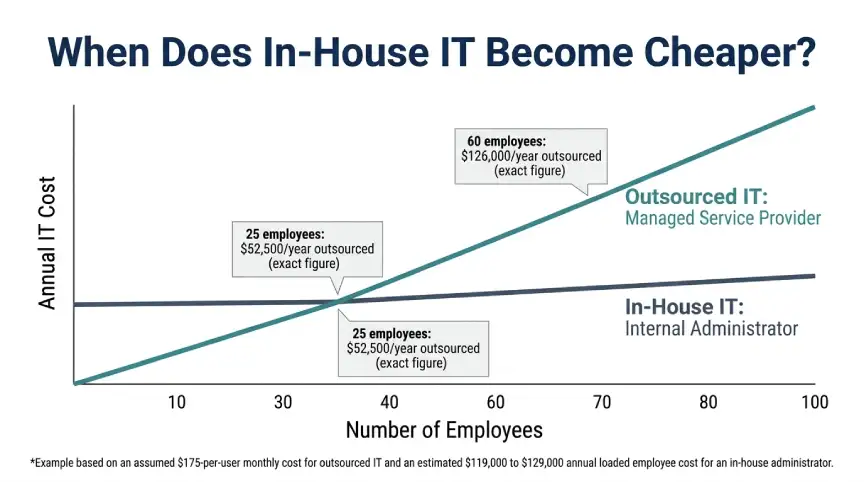
Let’s run in-house IT vs. outsourced IT for small business through simple arithmetic. A 25-person company paying 175 dollars per user spends 52,500 dollars a year on managed IT. One median-paid administrator costs roughly 119,000 to 129,000 dollars with benefits. That’s a gap of about 66,000 to 76,000 dollars in favor of outsourcing.
Now grow the team. At 175 dollars per user, 60 people cost 126,000 dollars a year. That’s right at the cost of one salaried administrator. On salary alone, the crossover lands near 50 to 70 users, depending on plan price.
That’s lower than the 75 to 100 employee tipping point many provider guides quote. Why the gap? One administrator can’t cover nights, vacations, and every specialty. Near the crossover, firms often hire one person and still pay a provider for specialties.
Treat this as arithmetic, not a forecast. Your local salaries, plan price, and tool costs will move the line. Rerun it with real quotes before deciding.
Which Option Fits Which Business
Weighing in-house IT vs outsourced IT for small business depends mostly on headcount and risk. Here’s how it plays out by size. Treat the thresholds as starting points, not laws.
Under 15 people: outsource
You don’t have enough work for a full-time hire. A provider’s minimum fee may look steep, but it usually costs far less than a salary. Even a tiny shop needs backup, patching, and someone to call. Pay for that coverage instead of leaning on the tech-savvy employee.
15 to 75 people: outsource, or co-manage
This is the sweet spot for managed IT. Per-user pricing scales smoothly, and you get security and backup skills you couldn’t hire cheaply. If someone internal already handles daily requests, look at co-managed IT. It keeps your person and adds provider depth.
75 and up: run the numbers
Here the math flips for some companies. A full-time hire gains value when requests pile up daily. You’ll likely still want outside help for security and after-hours coverage. Build a simple three-year cost model before choosing.
Regulated or technology-driven firms: lean in-house or hybrid
If technology is your product, hire in-house. If you handle health, payment, or defense data, compliance adds cost either way. Hybrid setups often fit best. Your staff owns the systems, and a provider covers monitoring and audits.
The Middle Path: Co-Managed IT
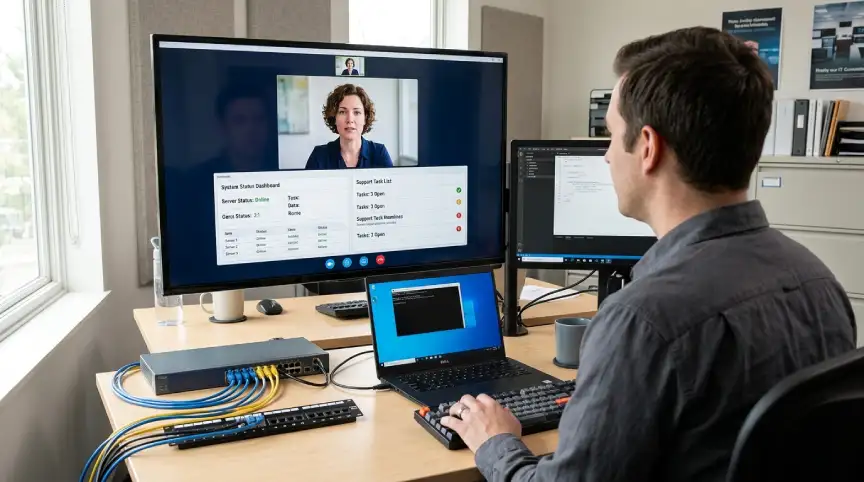
Co-managed IT splits the work. Your internal person handles daily requests and knows your quirks. The provider supplies tools, monitoring, after-hours coverage, and specialists. Provider guides list co-managed plans at roughly 65 to 120 dollars per user monthly.
Block-hour contracts are another option. You buy hours at roughly 150 to 250 dollars each and use them when needed. That suits companies with steady systems and occasional projects. It’s a poor fit if something breaks every week.
Whatever model you pick, write down who owns what. Who responds to an outage, a breach, a lost laptop? Our guide to an incident response plan for small businesses is a good template. Unclear ownership costs more than any subscription.
Contract Details That Change the Price
Read the minimums first. A provider may bill a flat monthly floor even if your headcount drops. Ask how quickly you can add or remove users. Flexibility matters most for seasonal or fast-growing teams.
Ask what “support” includes, such as on-site visits, after-hours calls, and project work. Many surprises hide in the word “extra.” Get response times in writing. Ask what happens when they’re missed.
Ask for references from companies your size. A provider that’s great with 200-person firms may treat a 20-person client as an afterthought. Call two of them, and ask how fast tickets actually close. Ten minutes on the phone beats a polished proposal.
Check data ownership and exit terms. You should own your passwords, documentation, and backups, not the provider. Ask how handoff works if you leave. Our guide to IT system monitoring explains what good coverage includes.
Frequently Asked Questions
In-house IT vs outsourced IT for small business: which costs less?
For most companies under about 50 to 75 employees, outsourcing costs less. Past that, a hire can pay off, especially when requests pile up daily.
How much does outsourced IT cost per employee?
Provider guides list 100 to 300 dollars per user monthly. Many small-business plans sit near 150 to 200, and compliance or project work usually costs extra.
How much does a full-time IT hire really cost?
BLS puts median pay for systems administrators at 99,130 dollars. With benefits and payroll taxes, expect roughly 119,000 to 129,000 dollars, before tools.
Can one IT person handle everything?
Rarely. One person can’t cover vacations, nights, and every specialty like security and cloud. A co-managed setup fills those gaps.
What is co-managed IT?
Your internal person handles daily needs while a provider adds tools, monitoring, and specialists. Guides price it around 65 to 120 dollars per user monthly.
Decide With a Spreadsheet, Not a Sales Pitch
In-house IT vs outsourced IT for small business isn’t a values question. It’s arithmetic plus risk. Get two or three quotes, price one hire fully loaded, and compare coverage hour by hour. The cheaper option on paper isn’t always cheaper at 2 a.m. on a Sunday.
Revisit the choice every year or two. A company that doubles in size, or takes on regulated data, outgrows its old setup fast. Put the review on the calendar before your contract renews.
Like seeing the math before spending? The rest of our Business Tech coverage works the same way. Next up: how to negotiate a SaaS contract without overpaying.





No Comment! Be the first one.