





Why AI Agents With Persistent Memory Are Reshaping Business Workflows in 2026
AI agents with persistent memory are moving past one off chats. Here is what changed in 2026 and why it matters for your team.

For years, AI chatbots forgot everything the moment a session ended. Every new chat meant repeating your context from scratch. That is changing fast in 2026. AI agents with persistent memory now carry context across days, projects, and tools. This single shift is reshaping how teams plan, delegate, and trust AI systems.
Table Of Content
- What Persistent Memory Means for AI Agents
- Why This Trend Is Accelerating in 2026
- How Persistent Memory Works Under the Hood
- Real Business Use Cases for Memory-Equipped AI Agents
- Human-Supervised Agents Are Winning Over Full Autonomy
- Privacy and Trust Challenges With AI Agent Memory
- Getting Started With AI Agents That Remember Context
- How This Differs From Traditional Chatbots
- What Comes Next for This Technology
- Common Mistakes Teams Make With Memory-Equipped Agents
- What to Ask a Vendor Before You Buy
- Key Takeaways
- FAQ
What Persistent Memory Means for AI Agents
Persistent memory lets an AI agent store facts about a user or a project. It recalls preferences, past decisions, and task history in later sessions. A normal chatbot starts fresh every single time. A memory-equipped agent behaves more like a colleague than a disposable tool.
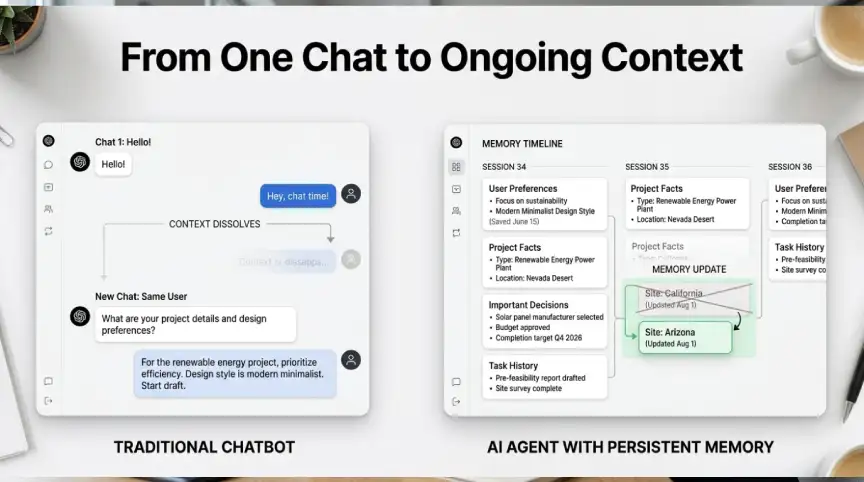
The memory itself is not one giant saved transcript. Most systems store structured facts, short summaries, and key decisions instead. This design keeps responses fast and focused. It also stops the model from drowning in old, irrelevant data.
Good systems update memory as facts change over time. If a project ends or a preference shifts, the agent can forget the old version. This keeps stored context accurate instead of stale. Without this step, an agent could act on outdated information for months.
Why This Trend Is Accelerating in 2026
Industry data from September 2026 points to a clear pattern. Persistent, context-aware agents are replacing generic chat tools across sales and support. Multimodal systems that handle text, voice, and documents are now standard, not a bonus feature.
Vendors are now competing on memory quality, not just raw model power. Commentators have started calling this the agent memory race. Businesses want assistants that remember, because repeated work wastes time and money. A system that recalls a client’s full history can save hours every single week.
Smaller, specialized models are also gaining ground for focused memory tasks. They run cheaper and faster than large general-purpose models. This makes long-term memory features easier to afford for smaller teams. Cost was one of the biggest blockers to adoption before this year.
How Persistent Memory Works Under the Hood
Most memory-equipped agents combine two separate systems. The first is short-term context, which holds the live conversation inside the model’s window. The second is long-term storage, often a vector database or a structured file.
When a new session starts, the agent retrieves relevant memories first. It pulls only the facts that matter for the current task at hand. This retrieval step keeps costs down and keeps answers on target. Good platforms also let users view, edit, or delete stored memories anytime.
Some platforms sort memory into separate categories, like preferences, project facts, and decisions. This structure helps the agent apply the right memory to the right task. It also lowers the risk of mixing up unrelated clients or projects. Clear memory boundaries are now a common feature request from buyers.
Real Business Use Cases for Memory-Equipped AI Agents

Support teams use these systems to track a customer’s full history automatically. The agent recalls prior tickets, preferences, and past fixes without being asked. This cuts down on repeat questions and speeds up resolution time. Support leads report fewer escalations once agents remember context correctly.
Sales teams use similar tools to track deal history and stakeholder details. An assistant with long-term memory can prep a rep before every call. It surfaces past objections, budget notes, and next steps without manual digging. This saves prep time and reduces missed follow-ups across a busy pipeline.
Content and marketing teams also benefit from agents that remember brand rules. The agent can recall approved messaging, past campaigns, and house style guides. This keeps output consistent across a large team of writers and editors. It also cuts down the number of review cycles before publishing.
Internal operations teams use memory-equipped agents for IT and HR requests. The agent recalls a staff member’s device history, past tickets, and open requests. This reduces the number of back-and-forth questions during a support chat. It also helps new hires get answers faster during their first weeks.
Human-Supervised Agents Are Winning Over Full Autonomy

Despite the hype, fully autonomous agents are not the dominant trend right now. Industry commentary through 2026 points toward human-supervised workflows instead. AI is best used for drafting, sorting, and summarizing routine tasks. Humans still own final judgment, risk decisions, and formal approvals.
This matters for how teams should roll out memory-equipped agents. The goal is not removing people from the loop entirely. Instead, memory lets the agent bring sharper context to every human review. That makes each decision faster and better informed for the person in charge.
Privacy and Trust Challenges With AI Agent Memory
Storing long-term memory raises real privacy questions for any business. Teams need clear rules about what an agent can remember and for how long. Sensitive data, like financial or health details, needs extra protection layers. Many platforms now let admins set retention limits by data type.
Trust also depends on transparency between the user and the system. People should be able to see what an agent has stored about them. They should also be able to correct or delete memories that are wrong. Skipping this step risks both compliance trouble and user distrust down the line.
Getting Started With AI Agents That Remember Context
Start small before rolling memory features out across an entire team. Pick one repetitive workflow, like support tickets or sales prep, as a pilot. Track how much time the team saves once context carries between sessions. Expand to other workflows only after the first pilot proves its value.
Set clear memory retention rules before any sensitive data enters the system. Decide what gets stored, for how long, and who can view it. Review these rules every few months as your usage and team size grow. This keeps the rollout safe as adoption expands across departments.
How This Differs From Traditional Chatbots
Traditional chatbots follow a fixed script and answer one question at a time. They cannot connect what you said last week to what you ask today. Memory-equipped agents work differently by design. They treat each conversation as part of an ongoing relationship, not an isolated event.
This shift changes what teams should expect from a support or sales tool. A traditional chatbot needs constant re explaining and repeated setup steps. An agent with memory needs setup once, then improves as it learns more. Over time, this reduces friction for both the user and the support team.
What Comes Next for This Technology
Expect more competition over memory continuity and personalization through the rest of 2026. Vendors are also blending text, voice, documents, and visuals into single workspaces. An assistant may soon handle a video call, a document, and a chat inside one thread.
Open-weight models are also closing the gap with proprietary systems fast. Several are now built specifically for agent use, with memory and tool use built in. This should make persistent memory tools cheaper and easier to deploy for smaller teams.
Robotics and other physical systems are also starting to gain memory features. A warehouse robot that remembers past routes can plan better paths over time. This trend, sometimes called physical AI, is still early but growing quickly. It shows memory is becoming a core building block, not a niche feature.
Common Mistakes Teams Make With Memory-Equipped Agents
Many teams turn on every memory feature at once without a clear plan. This creates cluttered, unfocused memory that confuses the agent over time. It also raises unnecessary privacy risk by storing data nobody actually needs. Start with a narrow, useful memory scope and expand only when needed.
Another common mistake is skipping regular memory reviews after launch. Stored facts can go stale as projects end or people change roles. Teams that never audit memory end up with outdated or wrong context. A short monthly review keeps stored memory accurate and genuinely useful.
Some teams also forget to train staff on how memory features work. Employees may not realize an agent remembers details across sessions. This can lead to oversharing sensitive information without thinking it through. A short onboarding note on memory behavior avoids most of these problems.
What to Ask a Vendor Before You Buy
Ask exactly where memory data gets stored and for how long. Find out if you can export or delete all stored memory on demand. Ask whether memory is shared across your whole team or kept private per user. These answers reveal a lot about how mature a platform really is.
Also ask how the system decides which memories to keep or drop. Some tools let you set rules yourself, while others handle this automatically. Request a short trial period before committing to a long-term contract. A real pilot with your own data reveals issues that demos rarely show.
Key Takeaways
- AI agents with persistent memory remember facts, preferences, and history across sessions.
- This trend is growing fast because it cuts repeat work and saves time.
- Most systems combine short term context with long term structured storage.
- Human-supervised workflows are outperforming fully autonomous agent setups in 2026.
- Privacy controls and memory transparency are becoming standard buyer requirements.
FAQ
Do these systems store every conversation word for word?
No. Most platforms store structured facts and summaries instead of full transcripts. This keeps retrieval fast and avoids overwhelming the model with old data.
Can I delete what an assistant remembers about me?
Most modern platforms let users view and delete stored memories directly. Always check a vendor’s memory settings before sharing sensitive information with any tool.
Are memory-equipped AI agents safe for business use?
They can be, if the vendor offers clear retention limits and access controls. Ask about data handling before rolling any agent out across your team.
What is the difference between context and persistent memory?
Context is what the model holds during one single active session. Persistent memory is what the system stores and recalls after that session ends.
Do smaller companies really need this kind of technology?
Not always, but repetitive workflows benefit most from agents that remember. Start with one pilot workflow before deciding if wider adoption makes sense.
How much does it cost to add memory to an AI agent?
Costs vary widely depending on the platform and how much data you store. Many vendors now include basic memory features in standard subscription plans.
Will persistent memory replace human customer support teams?
Unlikely in the near term, since most businesses still prefer human review. Memory simply gives human teams better context before they make a decision.




No Comment! Be the first one.