




How RAG Helps AI Models Use Real Facts, Search Your Data, and Give Better Answers
AI models can sound sure and still be wrong. This guide explains how retrieval-augmented generation fixes that gap and how you can start using it.
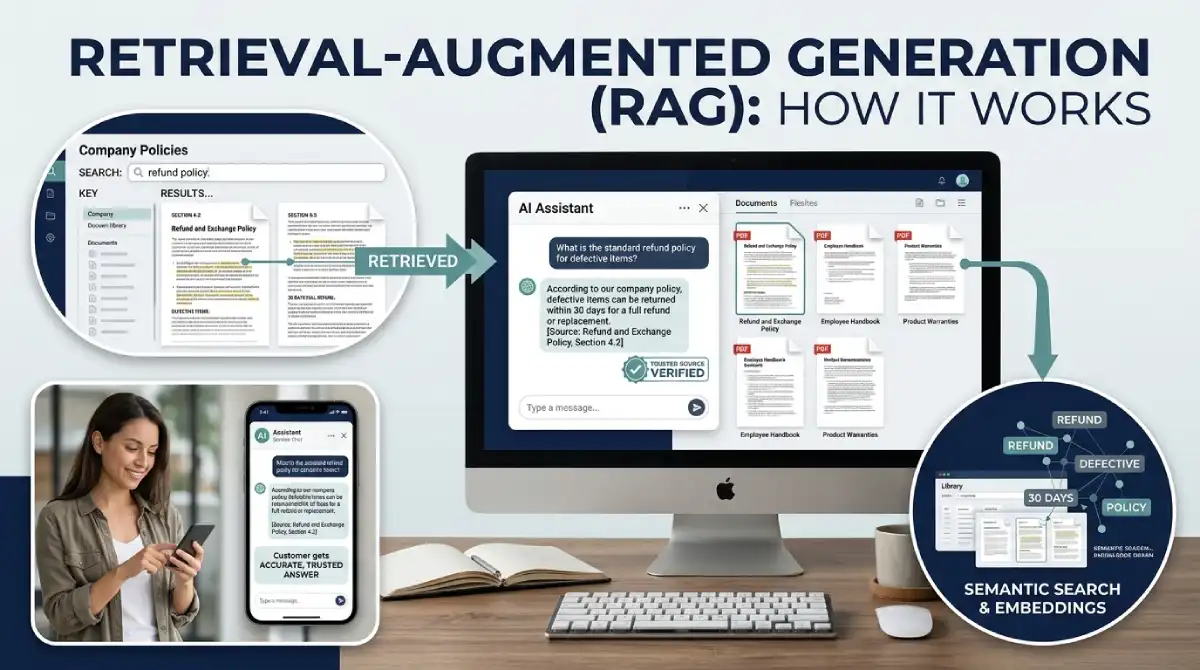
Picture a chatbot telling a shopper your store offers 90-day returns. Your real policy says 30. Nobody lied, because the model simply filled a gap with a confident guess. Retrieval-augmented generation closes that gap.
Table Of Content
- What Retrieval-Augmented Generation Actually Means
- Why a Plain Model Isn’t Enough
- How the Process Works, From Files to Answers
- Embeddings Without the Math
- The Parts You’ll Actually Work With
- A Refund Question, Step by Step
- What You Gain From RAG
- Where RAG Goes Wrong
- Smarter Versions of the Basic Setup
- RAG or Fine-Tuning?
- How RAG Supports AI Agents
- Real Uses People Already Rely On
- Practical Tips for Better Answers
- How to Tell If Your RAG Answers Are Good
- Words You’ll See in RAG Tutorials
- Choosing Tools Without Overthinking It
- Build a First RAG App This Weekend
- Quick Answers to Common RAG Questions
- Where to Go From Here
What Retrieval-Augmented Generation Actually Means
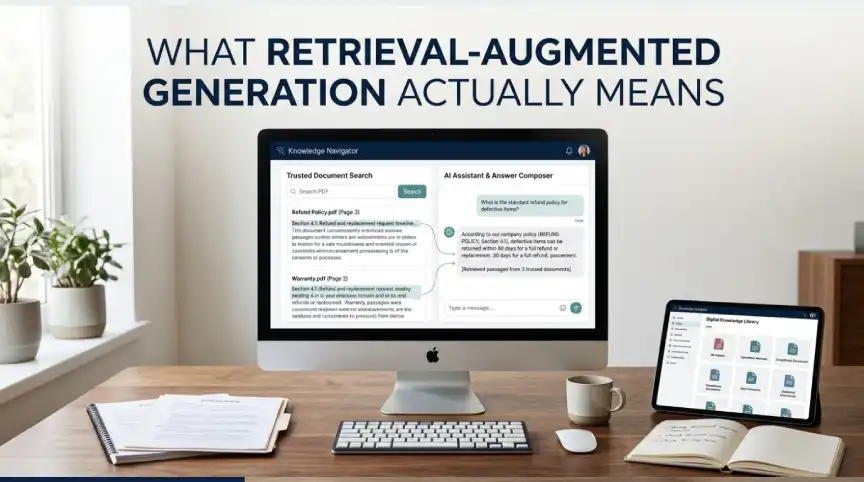
Retrieval-augmented generation, or RAG, sounds heavy. The idea is simple. Before an AI model answers, it searches a trusted set of documents. Then it writes the reply using what it found.
A 2020 paper from Facebook AI Research, now part of Meta, gave the method its name. The authors paired a language model with a search index. That pairing improved answers on tasks that need real knowledge.
I like to compare it to a good support agent. They don’t memorize the whole handbook. They know where to look. That’s retrieval-augmented generation in everyday terms.
Why a Plain Model Isn’t Enough
Language models learn from a frozen snapshot of text. Anything after the training cutoff is invisible to them. Anything private, like your pricing sheet or internal wiki, was never in the snapshot at all.
So what happens when you ask something the model can’t know? Often it guesses. The guess reads smoothly, which makes it dangerous. Researchers call this hallucination.
You could retrain the model with new data. For most teams, that’s slow and expensive. Retrieval-augmented generation takes a lighter route. The model stays the same, and the documents it reads change.
How the Process Works, From Files to Answers
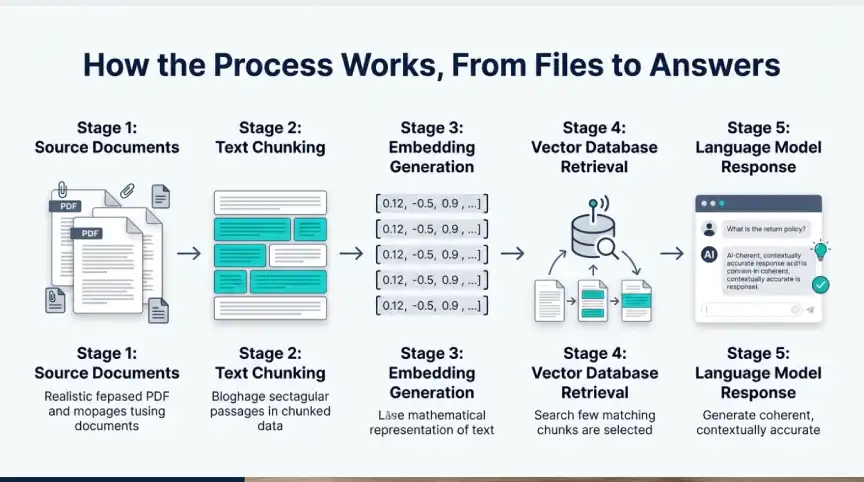
Setup comes first. You gather your files, such as PDFs, help pages, and policy docs. Each file gets cut into small chunks, usually a few hundred words long. Smaller pieces make searching sharper.
Next, an embedding model turns every chunk into a long list of numbers. Those numbers capture meaning, not just spelling. A chunk about refunds and a question about getting money back land near each other. All the lists go into a vector database.
Then a user asks something. The question gets the same number treatment. The database returns the closest chunks, often three to five of them.
Those chunks are pasted into a prompt along with the question. The language model reads both and writes an answer. Setup happens once, while search and writing happen on every question. That’s why replies still feel fast.
Embeddings Without the Math
Embeddings confuse beginners more than anything else in RAG. Here’s the short version. A model reads some text and returns a list of numbers, often thousands long. Similar meaning gives similar lists.
Picture a map where every sentence has a location. Questions about refunds cluster in one neighborhood. Questions about shipping cluster in another. Search simply finds the closest neighbors to your question.
This is why RAG beats plain keyword search on messy language. Someone can type money back, and the system still finds the refund policy. No exact word match needed.
The Parts You’ll Actually Work With
You don’t need many tools to run a RAG system. Four pieces do most of the work. Knowing each one makes debugging far less painful.
Your documents come first. Messy, outdated files produce messy, outdated answers, no matter how clever the rest is. I’d spend more time here than anywhere else.
The embedding model and vector database handle search. Pinecone, Weaviate, Chroma, and pgvector are common picks. Chroma suits quick local tests, while pgvector helps if you already run Postgres.
The language model sits at the end. Give it clear instructions to answer only from the supplied text. Without that rule, it may wander back to its own memory.
A Refund Question, Step by Step
Let’s go back to the store with the 30-day policy. A shopper asks if she can return opened headphones. A plain model might invent a rule. Wrong answers like that cost real money and real trust.
With RAG, the system first searches the policy file. It finds the paragraph on opened items and hands it to the model. The model replies with the real rule and points to the policy page.
Now the shopper gets a correct answer, and your team gets a paper trail. You can see exactly which paragraph shaped the reply. That makes mistakes easy to trace and fix.
What You Gain From RAG
The biggest win is freshness. Update a document and the next answer reflects it. No retraining, no waiting. A pricing change made at nine can show up in answers by ten.
Accuracy improves too. Because the model leans on real text, it invents less. You can also show sources, which builds trust with readers who like to verify.
Cost and privacy matter just as much. You skip repeated training runs, and your files stay in your own store. They reach the model only when a question needs them. For small teams, retrieval-augmented generation is often the most practical way to ship useful AI.
Where RAG Goes Wrong
RAG fails quietly. When search fetches the wrong chunk, the model still answers with total confidence. Most broken projects I’d blame on retrieval, not on the model.
Chunk size trips up many beginners. Tiny chunks lose context, while huge ones drag in noise. A few hundred words with a small overlap is a fair start. Then you test.
Data hygiene counts as well. Duplicate pages, old versions, and broken tables all confuse search. A cleanup pass before indexing saves weeks of tuning.
Don’t forget access control. Not every employee should see every file. Make sure search only returns text that person is allowed to read.
Smarter Versions of the Basic Setup
Basic RAG searches once and answers. That’s enough for small, tidy data. Bigger projects add a few upgrades.
Hybrid search blends keyword matching with vector search. Keywords catch product codes and exact names. Vectors catch meaning when people phrase things loosely.
Reranking adds a second pass. A smaller model sorts the first results and keeps the best few. Many teams see their biggest quality jump from this step.
Agentic RAG goes further. An AI agent plans its own searches and tries again when results look weak. It handles tough questions better, though it costs more and runs slower. If you’ve read about agentic AI, this is where the two ideas meet.
RAG or Fine-Tuning?
People mix these up all the time. Fine-tuning changes how a model behaves. RAG changes what the model knows at the moment it answers.
Need fresh facts, like prices or policies? Pick RAG. Need a certain voice or format? Fine-tuning fits better, and plenty of products use both.
If you’re unsure, start with RAG. It’s quicker to build and easier to repair when something breaks. You can always add fine-tuning later.
How RAG Supports AI Agents
AI agents need dependable knowledge to act well. RAG gives them a memory they can search on demand. Without it, an agent may act on old or invented facts.
Most agent setups treat retrieval as one tool among many. The agent decides when to search and what to ask. Good research makes every later step stronger.
That’s also why interest in both topics keeps growing together. If you plan to build agents, learn RAG first. It will make everything else easier.
Real Uses People Already Rely On
Support bots read help center articles before replying. Search assistants pull web pages and then summarize them. You’ve probably used both without noticing.
Inside companies, RAG answers questions about HR rules, sales playbooks, and old project notes. New hires get answers in seconds instead of digging through folders. That alone can shorten onboarding.
Some medical, legal, and finance teams use it to scan long reports. They still check the sources themselves. RAG saves time, but it doesn’t replace expert judgment.
Practical Tips for Better Answers
Small fixes beat big rewrites here. Start by cleaning your sources and tagging each file with a date and topic. Those tags let search filter out stale material.
Next, split documents at headings or paragraph breaks instead of fixed lengths. Let neighboring chunks share a sentence or two so ideas stay connected. Then ask the model to name the source behind each claim.
Measure everything. Write down 20 real questions with correct answers and rerun them after every change. Track whether the right chunk shows up near the top. Without a test set, you’re only guessing.
How to Tell If Your RAG Answers Are Good
Judging an answer takes two checks. First, did search find the right chunk? Second, did the model use that chunk faithfully? A fluent reply can still fail either test.
Read the retrieved chunks next to the final answer. If the chunk says 30 days and the answer says 60, the model drifted. If the right chunk never appeared, search is your problem.
Keep a simple log of failures and sort them into those two groups. Patterns show up fast. You’ll soon know whether to fix your data, your search, or your prompt.
Words You’ll See in RAG Tutorials
Tutorials love jargon, so here is a quick decoder. A chunk is a small piece of a document. An embedding is a list of numbers that stands for meaning. A vector database stores those lists and finds close matches fast.
The context window is how much text a model can read at once. Hallucination means a confident answer that is false. Once these five terms click, most guides read easily.
Choosing Tools Without Overthinking It
Beginners often burn weeks comparing tools. Don’t. Pick one embedding model, one vector store, and one language model, then move on. You can swap parts later because a good RAG setup keeps them separate.
Hosted services save setup time but charge by usage. Self-hosted options cost less at scale but need more upkeep. Match the choice to your team size, not to hype.
Whatever you choose, log every question and every retrieved chunk from day one. Those logs become your best teaching material later. They also make audits painless.
Build a First RAG App This Weekend
Keep the goal narrow. Answering questions about one product manual is plenty for a first try. A small scope makes testing painless.
LangChain and LlamaIndex both ship ready-made tools for loading files, splitting text, and searching. Pair either one with Chroma and you can run everything on a laptop. A rough demo can come together in a few hours.
Then add one safety rule. Tell the model to say it doesn’t know when the text lacks an answer. That single line prevents a surprising number of wrong replies. After that, tweak chunking, search, and prompts one at a time.
Quick Answers to Common RAG Questions
Is a vector database the same thing as RAG?
No. A vector database is only the search part. RAG covers the whole loop of searching, adding context, and writing the reply.
Can RAG remove hallucinations completely?
No. It lowers the risk a lot, but wrong chunks or weak prompts can still cause errors. Show sources and keep testing.
Can a small website use RAG?
Yes. Plenty of free tools can index a few hundred pages. A site search helper makes a good first project.
How is it different from a normal search engine?
A search engine returns links and leaves the reading to you. RAG reads the best passages and writes a direct answer. It can cite them too, so you can still verify.
Where to Go From Here
RAG lets an AI read before it speaks. That one habit fixes stale knowledge and cuts down on guessing. It also keeps private data under your control.
Start small and track your results. Treat each wrong answer as a clue about which step needs work. Retrieval-augmented generation rewards patience far more than fancy tools.




No Comment! Be the first one.