




How to Create a Data Backup and Recovery Plan for Your Small Business Today
A backup only helps if the business also knows how to recover from it quickly. This guide walks through building a full data backup and recovery plan, covering roles, recovery time targets, and the...
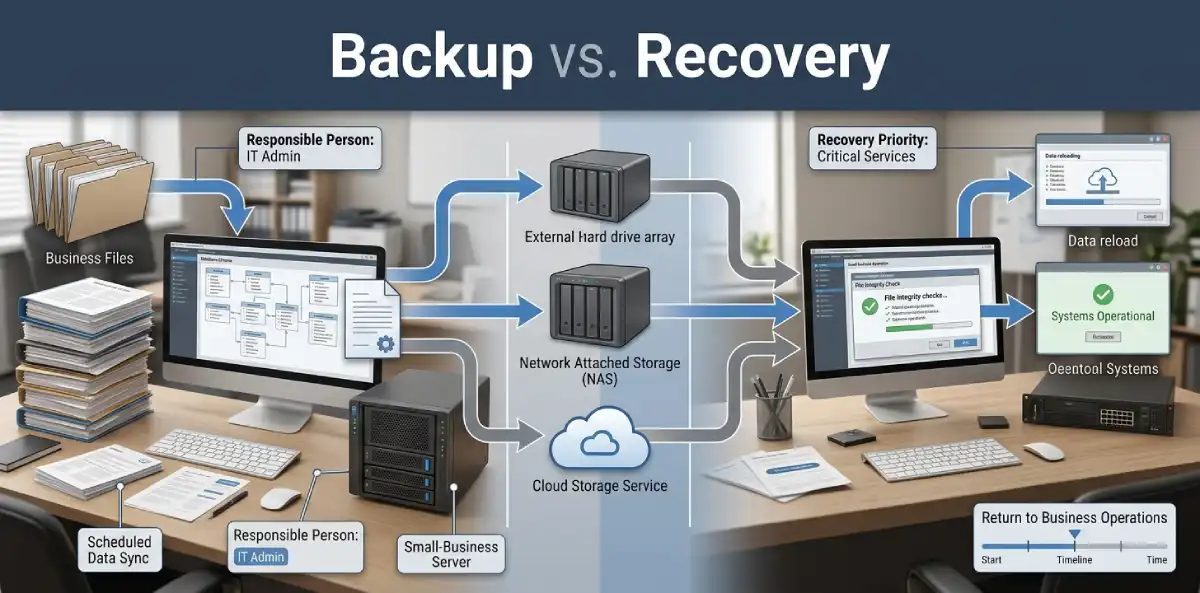
A data backup and recovery plan is the document that turns scattered backup habits into an actual business safeguard. It spells out what gets backed up, who is responsible, and exactly how the business gets back up and running after data loss. Most small businesses have pieces of this in someone’s head, but not written down anywhere.
Table Of Content
- What Makes a Recovery Plan Different From a Backup
- Why Every Small Business Needs a Written Plan
- Common Mistakes That Undermine Recovery Plans
- Understanding RTO and RPO
- What Belongs in the Plan
- Step-by-Step: Building the Plan
- Testing and Recovery Drills
- What This Means for Cost and Risk
- Frequently Asked Questions
- Turning Backups Into an Actual Safety Net
That gap matters more than it seems. A backup without a recovery plan behind it is a half-finished safety net. The business might have the files somewhere, but no clear path for actually using them under pressure.
What Makes a Recovery Plan Different From a Backup
Backing up data and recovering from data loss are two separate problems, even though people often talk about them as one thing. Backing up is about creating copies. Recovery is about actually using those copies to get the business running again.
A recovery plan covers the second half of that equation. It answers questions a simple backup schedule never does, like which systems get restored first, who makes that call, and how long the business can realistically tolerate being down. Skipping this part is exactly why backups sometimes exist but still fail to prevent a bad week.
Why Every Small Business Needs a Written Plan

Data loss rarely comes from just one source. Hardware failure, fire, theft, human error, and cyberattacks can all wipe out critical files, sometimes in ways no single backup tool fully protects against on its own.
Without a written plan, recovery decisions get made in the moment, often by whoever happens to be available. That usually means slower decisions, missed steps, and inconsistent results depending on who is handling the crisis. A written plan removes that guesswork entirely, since the hard decisions were already made calmly, well before any pressure existed.
Smaller teams sometimes assume this level of planning is only for larger companies. In practice, small businesses often have less redundancy than larger ones, which makes a clear plan even more valuable when something actually goes wrong. A single overworked laptop or one shared server often carries more weight in a small business than an entire department does in a larger one.
Common Mistakes That Undermine Recovery Plans
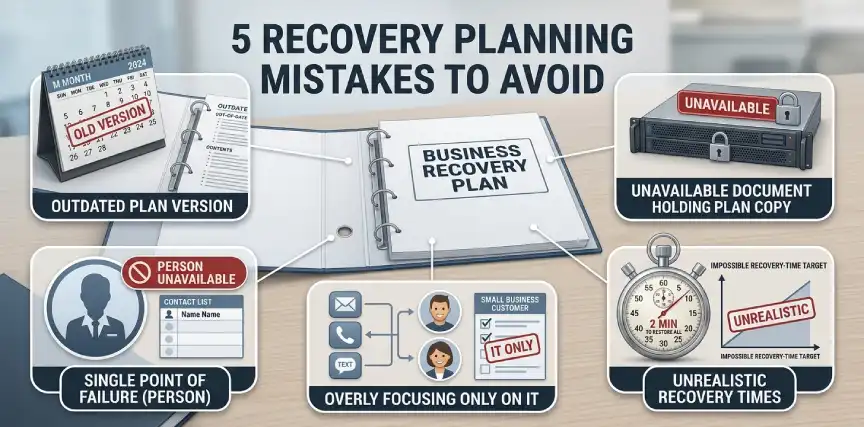
A handful of avoidable mistakes show up repeatedly in small business recovery planning, often without anyone realizing until it is too late.
- Writing the plan once and never updating it. New software, new vendors, and new employees all change what the plan actually needs to cover.
- Storing the only copy of the plan on the network it describes. If that network goes down, the instructions for fixing it go down too.
- Setting RTO and RPO targets that sound good but were never actually tested. A four-hour recovery target means little if nobody has confirmed it is achievable.
- Assuming one person will always be available to lead recovery. Illness, vacation, or turnover can leave a plan with no clear owner exactly when it matters most.
- Treating the plan as an IT-only document. Recovery decisions often involve customer communication, financial approvals, and legal considerations that go beyond technical restoration.
Fixing even a few of these gaps meaningfully improves how a business actually performs during a real incident, often without spending anything extra.
Understanding RTO and RPO
Two terms sit at the center of almost every real recovery plan, and understanding them shapes nearly every other decision in the document.
| Term | What It Measures | Small Business Example |
|---|---|---|
| Recovery Time Objective (RTO) | How long the business can be down before serious harm occurs | Four hours for order processing systems |
| Recovery Point Objective (RPO) | How much data loss is acceptable, measured in time | One hour of lost data for a busy sales database |
Setting these numbers forces a useful conversation. A shorter RTO or RPO usually costs more to achieve, so the business gets to decide deliberately where that investment actually matters most, rather than guessing after the fact.
What Belongs in the Plan
A workable plan does not need to be long, but it does need to cover a specific set of essentials clearly enough that someone unfamiliar with the details could follow it.
- A full inventory of critical systems and data, ranked roughly by how much damage losing each one would cause.
- Clear RTO and RPO targets for each critical system, set in advance rather than decided during a crisis.
- Named roles and responsibilities, so it is obvious who leads recovery and who handles each specific system.
- Step-by-step restoration procedures, written specifically enough that someone other than the usual IT contact could follow them.
- A communication plan covering how employees, customers, and partners get updated during an extended outage.
Keeping this list current matters as much as writing it in the first place. New software and new critical systems should get added as the business grows.
Step-by-Step: Building the Plan
Most small businesses can put together a solid first version of this plan within a few focused sessions, without hiring outside help.
- List every system and data source that would hurt the business if lost. Include customer databases, financial records, email, and any core operational software.
- Assign an RTO and RPO to each item on that list. Be honest about what the business can actually tolerate, not what sounds impressive on paper.
- Match each system to a backup method that supports those targets. Faster recovery needs generally call for more frequent, more accessible backups.
- Write out the actual restoration steps for your most critical systems. Keep the language simple enough for someone under stress to follow without confusion.
- Assign clear ownership for each part of the plan. Include backup contacts in case the primary person is unavailable when an incident occurs.
- Store the plan somewhere accessible even if primary systems are down. A plan trapped on the exact server that just failed defeats its own purpose.
Once this exists, treat it as a living document rather than a one-time project to check off a list.
Testing and Recovery Drills
A plan that has never been tested is only a theory. Small businesses that skip testing often discover gaps only during a real emergency, which is the worst possible time to learn a backup was incomplete or a contact list was outdated.
Run a recovery drill at least twice a year. Pick one critical system and actually walk through restoring it, timing how long the process takes against the RTO set earlier. If your team has already reviewed cybersecurity tools for small businesses, folding a recovery drill into that same review cycle keeps both efforts consistent instead of scattered across the calendar.
Update the plan immediately after any drill that reveals a gap. A recovery plan that never changes despite failed tests provides a false sense of security that can be more dangerous than having no plan at all.
What This Means for Cost and Risk
A written recovery plan costs almost nothing beyond the time spent building and testing it. Most small businesses already own the tools needed to execute one, they simply lack the documented process tying everything together.
The cost of skipping this shows up during an actual incident, in the form of extended downtime, lost revenue, and rushed decisions made under pressure. Insurers reviewing coverage during cyber insurance audits increasingly expect to see a documented recovery process, not just proof that backups exist somewhere. A tested plan can meaningfully affect both premiums and how smoothly a claim gets processed after a real event.
There is a competitive angle here too, even if it rarely gets discussed openly. Clients evaluating vendors increasingly ask about data handling and recovery readiness before signing contracts. A business that can answer confidently, with an actual document behind that answer, tends to stand out against competitors who can only offer reassurance.
Frequently Asked Questions
What is the difference between a backup plan and a recovery plan?
A backup plan focuses on creating copies of data. A recovery plan covers how the business actually restores and resumes operations using those copies.
What are RTO and RPO in simple terms?
RTO measures how long the business can be down before it suffers serious harm. RPO measures how much data loss, in time, the business can tolerate.
How often should a recovery plan be tested?
Twice a year is a reasonable baseline for most small businesses, with additional testing after major system changes.
Does a small business really need a formal written plan?
Yes. Without one, recovery decisions get made under pressure, often inconsistently, which tends to extend downtime and increase the overall cost of an incident.
Who should maintain the recovery plan?
Ownership can sit with one operations lead, but the plan should name backup contacts too, so a single absence never leaves it unmanaged.
Turning Backups Into an Actual Safety Net
A data backup and recovery plan turns scattered backup habits into something the business can rely on. Setting clear recovery targets, assigning ownership, and testing the plan regularly closes the gap that backups alone leave open.
None of this needs to happen all at once. Starting with your most critical systems and expanding from there still puts the business meaningfully ahead of relying on backups with no real plan behind them.
More practical business protection guides like this one live in the Business Tech section.





No Comment! Be the first one.